

Hello everyone!
I want to stream CS:GO\Dota 2\DayZ\H1Z!, hope you guys can help me to find the best option with my stats.
Thanks for helping!
Motherboard: MSI B75MA-P45
CPU: QuadCore Intel Core i7-3770, 3700 MHz
Memory: DIMM4: Crucial CT51264BA1339.C16F 2x
VGA: NVIDIA GeForce GTX 660
Operation System: Microsoft Windows 7
Windows Resolution: 1920x1200 (16:10)
CSGO Resolution: 1920x1200 (16:10 Fullscreen)
Ingame FPS without streaming: 250-280+
Ingame FPS with streaming: 150-200 (sometimes lower than 100fps).
Speedtest results:
Amsterdam: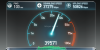
PING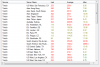
I want to stream CS:GO\Dota 2\DayZ\H1Z!, hope you guys can help me to find the best option with my stats.
Thanks for helping!
Motherboard: MSI B75MA-P45
CPU: QuadCore Intel Core i7-3770, 3700 MHz
Memory: DIMM4: Crucial CT51264BA1339.C16F 2x
VGA: NVIDIA GeForce GTX 660
Operation System: Microsoft Windows 7
Windows Resolution: 1920x1200 (16:10)
CSGO Resolution: 1920x1200 (16:10 Fullscreen)
Ingame FPS without streaming: 250-280+
Ingame FPS with streaming: 150-200 (sometimes lower than 100fps).
Speedtest results:
Amsterdam:
PING
