

I wasn't sure where to post this. This is more of a fix for myself. I was hoping this would help someone if they had this issue. This made my gameplay while streaming 75% better.
If you are receiving okay FPS, let's just say around 45-55 fps streaming witcher 3. While streaming you get video stutter even though you have 30+ fps. I did the following:
-Disabled Aero in OBS
-In OBS set your FPS below the Max Fps when in a crowded area while streaming (in town, near enemies, near water and people) I was running 52ish FPS so I made mine 45 FPS.
***Note make changes to your in game settings prior following these steps below. Such as your graphics quality, post processing and so on.
-Go to C:\Users\yourpcname\Documents\The Witcher 3, open user setting file (not the .bak file) with notepad.
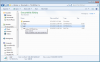
-At the bottom find LimitFPS. After the LimitFPS= type the fps under your max fps in game while streaming (Ex. LimitFPS=45) the same as OBS.
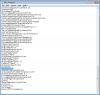
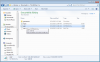
-Save the user settings and right click it and go to properties. Check Read-only. click ok.
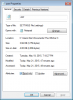
-If you want to change your in game settings you have to uncheck Read-only , make your changes in game and then Recheck Read-only . The game has to be closed out to do any changes with user setting file.
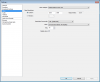
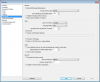
My settings for OBS
---------------------------------------
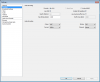
My PC:
I7-930 OC 4.0 Ghz
GTX 770 4gb small OC
6 Gigs Ram
If you are receiving okay FPS, let's just say around 45-55 fps streaming witcher 3. While streaming you get video stutter even though you have 30+ fps. I did the following:
-Disabled Aero in OBS
-In OBS set your FPS below the Max Fps when in a crowded area while streaming (in town, near enemies, near water and people) I was running 52ish FPS so I made mine 45 FPS.
***Note make changes to your in game settings prior following these steps below. Such as your graphics quality, post processing and so on.
-Go to C:\Users\yourpcname\Documents\The Witcher 3, open user setting file (not the .bak file) with notepad.
-At the bottom find LimitFPS. After the LimitFPS= type the fps under your max fps in game while streaming (Ex. LimitFPS=45) the same as OBS.
-Save the user settings and right click it and go to properties. Check Read-only. click ok.
-If you want to change your in game settings you have to uncheck Read-only , make your changes in game and then Recheck Read-only . The game has to be closed out to do any changes with user setting file.
My settings for OBS
---------------------------------------
My PC:
I7-930 OC 4.0 Ghz
GTX 770 4gb small OC
6 Gigs Ram
Attachments
Last edited: