


You are using an out of date browser. It may not display this or other websites correctly.
You should upgrade or use an alternative browser.
You should upgrade or use an alternative browser.
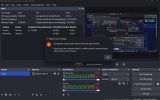
Starting the output failed
- Thread starter vishwatej_1455
- Start date

qhobbes
Active Member
You'll need to you use an older version of OBS. Try the last version of 27 or 28. https://github.com/obsproject/obs-studio/releases
vishwatej_1455
New Member
I am getting this lag i have tried multiple things but nothings working do you know what should i do ?
I don't want to change resolution (1600x900) and fps i am ok with other things
Log
Also what are these specs from your previous message i am not able to understand what do you wanna say
Use the Log Analyzer. i5-13420H @ 2.1 GHz | 16 GB RAM | GeForce RTX 4050L | 512 SDD
"While your internet speed may test as fast, this does not mean that it is stable."-twitch.tv
I don't want to change resolution (1600x900) and fps i am ok with other things
Log
Also what are these specs from your previous message i am not able to understand what do you wanna say
Use the Log Analyzer. i5-13420H @ 2.1 GHz | 16 GB RAM | GeForce RTX 4050L | 512 SDD
"While your internet speed may test as fast, this does not mean that it is stable."-twitch.tv
Attachments
qhobbes
Active Member
0. OBS is running on an Intel iGPU that is below minimum specs for OBS and is from 2013. This hardware is generally not powerful enough to be used for both gaming and running OBS. Situations where only sources from e.g. cameras and capture cards are used might work. Unless you need to record Windows stuff such as desktop and start menu, remove Display Capture from your scene and use Game OR Window capture for your scene.
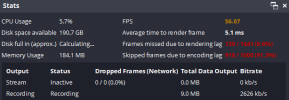
1. Your GPU is maxed out and OBS can't render scenes (10%) and encode frames (95%) fast enough. Running a game without vertical sync or a frame rate limiter will frequently cause performance issues with OBS because your GPU will be maxed out. OBS requires a little GPU to render your scene. Enable V-sync or set a reasonable frame rate limit (60, 30) that your GPU can handle without hitting 100% usage.
If that's not enough you may also need to turn down some of the video quality options in the game. If you want to use 900p, set the graphic settings in your game to minimum. If you are experiencing issues in general while using OBS, your GPU may be overloaded for the settings you are trying to use. Please check our guide for ideas why this may be happening, and steps you can take to correct it: GPU Overload Issues.
Those are just the specs of the current computer I use for streaming/recording; that's my signature.
1. Your GPU is maxed out and OBS can't render scenes (10%) and encode frames (95%) fast enough. Running a game without vertical sync or a frame rate limiter will frequently cause performance issues with OBS because your GPU will be maxed out. OBS requires a little GPU to render your scene. Enable V-sync or set a reasonable frame rate limit (60, 30) that your GPU can handle without hitting 100% usage.
If that's not enough you may also need to turn down some of the video quality options in the game. If you want to use 900p, set the graphic settings in your game to minimum. If you are experiencing issues in general while using OBS, your GPU may be overloaded for the settings you are trying to use. Please check our guide for ideas why this may be happening, and steps you can take to correct it: GPU Overload Issues.
Those are just the specs of the current computer I use for streaming/recording; that's my signature.
vishwatej_1455
New Member
i have fps set to 60 in game and also it lags even if i don't play games even when i am trying to record some windows general use like going in folder and all that
I already saw that overload issue post but there's a lot of stuff and i am unable to understand which one is causing problem in my case
How much does it cost to build that pc
I already saw that overload issue post but there's a lot of stuff and i am unable to understand which one is causing problem in my case
How much does it cost to build that pc
qhobbes
Active Member
It's still $599 + tax & shipping. I got the 4 year warranty and Windows Pro which added another $200.
vishwatej_1455
New Member
Also tell me something about my issue
vishwatej_1455
New Member
but i don't record only games i want to also record my screen so whatever i do in windows should be visible