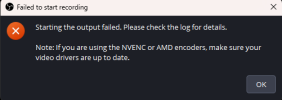
Starting the output failed. Please check log for details

TommyKaizeler

New Member
Hello, I'm trying to use my CPU to stream since is more capable than the GPU that I have, If I change to Software everything works but if using Hardware i can't stream. yesterday everything worked great today I'm having this problem. Thank you in advance
 

Attachments

1. Run OBS as Admin. Right click on the shortcut, properties, advanced, check box, ok, apply, ok.
2. Your log contains no attempt of a streaming session. Results of this log analysis are limited. Please post a link to a clean log file.
To make a clean log file, please follow these steps:

1) Restart OBS as Admin.
2) Try starting your stream. Make sure you replicate the issue as best you can, which means having any games/apps open and captured, etc.
3) Select Help > Log Files > Upload Current Log File. Send that link here.
 
@rapskie
1. Your OBS version identifies itself as '1.5.1-28.1.2-m112', which is not a released OBS version. Only the newest available stable version is supported. You can download the newest available stable version at https://obsproject.com/download
2. Run the newest available stable version OBS as Admin. Right click on the shortcut, properties, advanced, check box, ok, apply, ok.
 
Hello I've been using OBS for years but recently my video card broke. I've unplugged it in the tower and I'm now getting the, "OBS starting the output failed please check the log for details" message.

I've updated the drivers, and made sure I've got the newest version of OBS yet I still get the message. Here is the URL to the current log: https://obsproject.com/logs/0xGStCMj3O43rden

Any help would be appreciated, thank you for your time.
 

Attachments

  • OBS error.png
    OBS error.png
    10 KB · Views: 253
Hello I've been using OBS for years but recently my video card broke. I've unplugged it in the tower and I'm now getting the, "OBS starting the output failed please check the log for details" message.

I've updated the drivers, and made sure I've got the newest version of OBS yet I still get the message. Here is the URL to the current log: https://obsproject.com/logs/0xGStCMj3O43rden

Any help would be appreciated, thank you for your time.
I found a way to record. If I go to Settings > Output > then switch the "Output Mode" from "Advanced" to "Simple" it allows me to record videos again and goes to the correct file. Which is what I need to make videos for YouTube. Though I'm not a live streamer so that may make hurdles for that avenue I'm not sure.

If anyone knows why the advanced portion is giving me that error I'm still curious. Thanks for reading.
 
@AuieGames
1. Update your GeForce drivers to the newest available Studio Driver.
2. The Hardware-accelerated GPU scheduling ("HAGS") feature in Windows is currently known to cause performance and capture issues with OBS, games and overlay tools. We recommend disabling it via these instructions as a troubleshooting step. Be sure to restart after disabling it.
3. Having the Color Range set to "Full" will cause playback issues in certain browsers and on various video platforms. Shadows, highlights and color will look off. In OBS, go to "Settings -> Advanced" and set "Color Range" back to "Limited".
4. Browser hardware acceleration is currently disabled. Enabling acceleration is highly recommended due to the improvements to performance and significantly lower CPU usage for your 89 browser sources. This can be enabled in Settings -> Advanced.
5. Multiple Game Capture sources are usually not needed, and can sometimes interfere with each other (Pixel Hive Café, Game Sources and Pix Hive Cafe Vert). You can use the same Game Capture for all your games. If you change games often, try out the hotkey mode, which lets you press a key to select your active game. If you play games in fullscreen, use 'Capture any fullscreen application' mode.
6. Window, Game and Display Capture interfere with each. Never put them in the same scene (Pixel Hive Café and FS Game)
7. Make sure all 4 of your plugins are compatible with OBS 32.1.2 and are up-to-date.

Code:
09:01:08.082:     "status": {
09:01:08.082:         "html_en_us": "Twitch Enhanced Broadcasting requires at least 2 tracks per canvas.  You have either requested too few encodes (3) to support this, or we believe your GPU would not handle this workload.",
09:01:08.082:         "result": "error"
09:01:08.082:     }

You need to disable Enhanced Broadcasting in the Stream settings and just do 1 video track.

 
Back
Top