Slowdown in Local Recordings After the Auto-Config Wizard

TheElectroNuke

New Member
Guten tag! I have an HP Omen 35L with a minimal GPU/CPU bottleneck, and I've reset my OBS settings by starting fresh scenes and profiles as well as launching the auto-config wizard. My PC runs even the resource-heaviest games wonderfully at 1080p, but for some reason, these constant second-long slowdown attacks keep appearing in the MKV recordings (i.e., not in the games). That's even with my recording quality set to high, not indistinguishable. I run frequent SFC and DISM scans as well as disk cleanups, graphics driver updates, and very rare driver reinstallations using DDU (Christ, I actually hit the gray screen of death during one uninstallation today, which I thought permanently destroyed my display), and the cycle continues. No overlays, no game mode, and all the recommended GPU settings are active, and so much as moving the recording location to a 5TB SSD I bought recently and connected via 10mbps USB-C saw no greater outcome.

Given OBS is industry-standard, I desperately want this tool to work as it should, but it's discouraging that my PC does virtually everything right except this. Thank you for any help you can provide.
 

Attachments

Oh, and the slowdown is in fact present on all media players and editors, not just VLC, which is basically the only minute detail I haven't provided. Well, that and the process priority level having been set to high.
 
1. Audio buffering hit the maximum value. This can be an indicator of very high system load and may affect stream latency or cause individual audio sources to stop working. Keep an eye on CPU usage especially, and close background and unnecessary if needed. Occasion ally, this can be caused by incorrect device timestamps. Restart OBS to reset buffering.

Source affected (potential cause): Desktop Audio
2. In Windows, we recommend that "Game Mode" be enabled. Game Mode can be enabled via the Windows "Settings" app, under Gaming > Game Mode.
3. Remove Display Capture and use Game OR Window Capture for your game.
4.Your log contains no recording session. Results of this log analysis are limited. Please post a link to a clean log file.
To make a clean log file, please follow these steps:

1) Restart OBS.
2) Start your recording for at least 30 seconds. Make sure you replicate any issues as best you can, which means having any games/apps open and captured, etc.
3) Stop your recording.
4) Select Help > Log Files > Upload Current Log File. Send that link here.
 
High system load? That's strange. I obsess over minimizing the tabs and programs I leave open. Little else other than Windows Defender, Steam, Omen Gaming Hub, and a tiny utility called SuperF4, and the last two are in the background. I'm surprised game mode is recommended, but I took a fresh log nonetheless.

P.S. I've tried game capture, but it seems to lack antialiasing, making it look blockier than it should (I've already tried the recommended scaling options.) Maybe, that's a fair tradeoff for performance.
 

Attachments

Okay, sorry for the spam, this is just a very bizarre situation for me. I got the Nvidia overlay working, and I can confirm that it doesn't seem to lag like OBS does, even at more or less the same quality level. At this point, I have to assume it's OBS, even if no one else says so.
 
There's no lag in your encodings but as noted above, your audio lagged really bad in the first log. Audio is being routed to your headphones. Headphones that feature spacial surround. If that feature is enabled, that could cause timing issues as you are using the timing from the headphones with OBS & if it's lagging behind the video, there will be stuttering. Anyway, both logs are incomplete & audio thread timing is at the end of the log.
02:47:28.464: [win-wasapi: 'Desktop Audio'] update settings:
02:47:28.464: device id: default
02:47:28.464: use device timing: 1
02:47:28.498: WASAPI: Device 'Headphones (HyperX Cloud III)' [48000 Hz] initialized (source: Desktop Audio)

Some things you should do:
Enable Game Mode
Run your monitor @ 60HZ, not 59.
Test using stereo only & if there's still problems, test with your onboard audio.
 
Well, I'm glad to receive some advice on this, as the same slowdowns started appearing in my Nvidia overlay recordings, too, but even the onboard audio didn't help, nor did running a recording through Handbrake. I'm really starting to feel like this is it, especially since the Nvidia app for the other overlay refuses to even launch. If there's something wrong with my system, neither SFC or antivirus scans have been able to tell. Could it be an internal problem like dust buildup or thermal paste? Maybe, but my PC's pretty new for it to be a thermal paste problem.
 
Post the log, if you've closed OBS since the test, it will be complete. It may be your rig or it could just be the source. Some games have bad frame pacing so try capturing something different.

I have some videos I use for troubleshooting purposes. The downloads are still good if you want to give them a shot.
 
I tried again in a game from 2004 with pristine frame pacing. Same issue, unfortunately. I disabled my entire audio output, so I'm not sure how buffering could still be a problem. I should note my monitor supports G-Sync, but I've turned it on and off between recordings to the same result. Based on the log, is it only capturing some of the frames from the source? Also, what defines a bad source?
 

Attachments


Frame pacing issues in Sonic games can lead to irregular timing and microstuttering, particularly noticeable in titles like Sonic Adventure DX and Sonic the Hedgehog 4. These problems are often more pronounced on PC versions compared to console versions.
GitHub digitalfoundry.net

Understanding Frame Pacing Issues in Sonic Games​

Frame pacing refers to the timing of frames displayed in a game, which can significantly affect the gaming experience. In Sonic games, frame pacing issues can lead to irregular timing and microstuttering, particularly on PC versions.

Notable Titles with Frame Pacing Issues​

Game TitleFrame Pacing IssuesPlatform Differences
Sonic Adventure DXFrame-rate dips and pacing issuesMore pronounced on PC
Sonic the Hedgehog 4Microstuttering despite locked 60FPSIssues absent on consoles

Key Observations​

  • Sonic Adventure DX: Players have reported frame pacing issues with specific versions of the game, particularly when using certain DirectX wrappers. Older versions tend to perform better without these issues.
  • Sonic the Hedgehog 4: This game exhibits irregular frame timing, leading to noticeable microstuttering, especially during fast horizontal movements. Unlike the PC version, console versions do not show these pacing problems.

Conclusion​

Frame pacing issues in Sonic games can detract from the overall experience, especially on PC. Players may find that older versions or console versions provide a smoother gameplay experience.
GitHub
 
Looking a little closer at your last log, you bugged your Scene/Test. You started out with Display Capture, then you added Game Capture. Then you removed Game Capture & added Window Capture while Display Capture was never removed.

Only (1) Display, Game or Window Capture per Scene to avoid interference.....

23:52:54.240: Loaded scenes:
23:52:54.240: - scene 'Scene':
23:52:54.240: - source: 'Display Capture' (monitor_capture)

23:52:54.240: ------------------------------------------------
23:52:54.243: Device for 'Audio Output Capture' source Desktop Audio is also used for audio monitoring.
23:52:54.243: Deduplication logic is being applied to all monitored sources.
23:53:17.355: Settings changed (outputs)
23:53:17.355: ------------------------------------------------
23:53:56.917: User added source 'Game Capture' (game_capture) to scene 'Scene'
23:53:59.674: [game-capture: 'Game Capture'] attempting to hook process: sonic.exe
23:53:59.718: [game-capture: 'Game Capture'] using helper (compatibility hook)
23:53:59.762: [game-capture: 'Game Capture'] hook not loaded yet, retrying..
23:54:01.690: [game-capture: 'Game Capture'] attempting to hook process: sonic.exe
23:54:03.890: [game-capture: 'Game Capture'] capture stopped
23:54:05.707: [game-capture: 'Game Capture'] attempting to hook process: sonic.exe
23:54:05.724: [game-capture: 'Game Capture'] capture stopped
23:54:09.307: Saved screenshot to 'D:/Test/Screenshot 2026-05-11 23-54-09.png'
23:54:09.723: [game-capture: 'Game Capture'] attempting to hook process: sonic.exe
23:54:09.740: [game-capture: 'Game Capture'] capture stopped
23:54:13.740: [game-capture: 'Game Capture'] attempting to hook process: sonic.exe
23:54:27.439: User Removed source 'Game Capture' (game_capture) from scene 'Scene'
23:54:27.440: [game-capture: 'Game Capture'] capture stopped
23:54:31.116: User added source 'Window Capture' (window_capture) to scene 'Scene'

23:54:33.773: [window-capture: 'Window Capture'] update settings:
23:54:33.773: executable: sonic.exe
23:54:33.773: method selected: Automatic
23:54:33.773: method chosen: BitBlt
23:54:33.773: force SDR: false
23:54:35.572: [window-capture: 'Window Capture'] update settings:
23:54:35.572: executable: sonic.exe
23:54:35.572: method selected: Automatic
23:54:35.572: method chosen: BitBlt
23:54:35.572: force SDR: false
23:54:49.349: Starting recording due to hotkey
23:54:49.386: [obs-nvenc: 'simple_video_recording'] settings:
 
Concerning G-Sync, I don't use it. I run Fixed Refresh Rates/Fixed Monitor Tech only. No Variable anything anywhere on my system.
 

Frame pacing issues in Sonic games can lead to irregular timing and microstuttering, particularly noticeable in titles like Sonic Adventure DX and Sonic the Hedgehog 4. These problems are often more pronounced on PC versions compared to console versions.
GitHub digitalfoundry.net

Understanding Frame Pacing Issues in Sonic Games​

Frame pacing refers to the timing of frames displayed in a game, which can significantly affect the gaming experience. In Sonic games, frame pacing issues can lead to irregular timing and microstuttering, particularly on PC versions.

Notable Titles with Frame Pacing Issues​

Game TitleFrame Pacing IssuesPlatform Differences
Sonic Adventure DXFrame-rate dips and pacing issuesMore pronounced on PC
Sonic the Hedgehog 4Microstuttering despite locked 60FPSIssues absent on consoles

Key Observations​

  • Sonic Adventure DX: Players have reported frame pacing issues with specific versions of the game, particularly when using certain DirectX wrappers. Older versions tend to perform better without these issues.
  • Sonic the Hedgehog 4: This game exhibits irregular frame timing, leading to noticeable microstuttering, especially during fast horizontal movements. Unlike the PC version, console versions do not show these pacing problems.

Conclusion​

Frame pacing issues in Sonic games can detract from the overall experience, especially on PC. Players may find that older versions or console versions provide a smoother gameplay experience.
GitHub
Okay, but would this apply if the same frame drops occured with Manhunt 2, Red Dead Redemption 2, the Batman: Arkham games, desktop capture, and essentially all other sources? Especially when BetterSADX and the SA Mod Loader come with a plethora of frame pacing fixes?

As for the second reply, I simply had display capture disabled when I added game/window capture, so I'll see if anything changes with only one of those sources.
 
No idea, I don't play any of those games. Use the videos I provided, they are proven sources. No vetting required. If your system can't display or encode them without skips or duplicates, then your system is the cause. If there are no issues with displaying or encoding them, then it's the sources you are using.

It doesn't matter if it's disabled. It needs to be removed.
 
Last edited:
No idea, I don't play any of those games. Use the videos I provided, they are proven sources. No vetting required. If your system can't display or encode them without skips or duplicates, then your system is the cause. If there are no issues with displaying or encoding them, then it's the sources your are using.

It doesn't matter if it's disabled. It needs to be removed.
Well, I just said I would remove the display capture instead of disabling it. Is this in regards to microstutters during gameplay or during the recordings? Because microstutters do not exist in-game. Only in the recordings. This appears to be about the games themselves, not OBS.
 
Absolutely. The aim is to eliminate ALL known issues in your set-up that can cause stuttering or any issues. The capture not in use continues to try & hook...

It just may be the sources/games or it could be something else like your audio solution. It lagged bad in one log, I suspect it happens here & there & you don't even realize it's happening.
 
Okay, I officially have a headache. I just did a full DDU cleanout in safe mode, reinstalled everything Nvidia and AMD, got Bitdefender set up, reset my UACS, ran SFC through elevated PowerShell, checked online for a possible bottleneck, and the list goes on. What could be wrong with my audio solution if I've already tried having no audio devices connected? Otherwise, is it safe to assume that, if it's a system issue, it's probably a physical hardware issue?

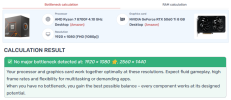
P.S. The overview in the image mentions 8GB, but my CPU and GPU both have 16GB. Also, I tried only having game capture added when recording Manhunt 2 (it was for a funny video on my blog.) Same slowdowns still.
 

Attachments

  • 1.png
    1.png
    96.1 KB · Views: 14
Yep, the sources in play &/or your system are suspect. OBS is not causing your stuttering.

Since you never produced a complete log, I have no idea exactly what your audio is or isn't doing. Is it running slow all the time? That info is at the end of the log....

Other considerations that vary game to game & may impact performance:
v-sync
REBAR
 
Yep, the sources in play &/or your system are suspect. OBS is not causing your stuttering.

Since you never produced a complete log, I have no idea exactly what your audio is or isn't doing. Is it running slow all the time? That info is at the end of the log....

Other considerations that vary game to game & may impact performance:
v-sync
REBAR
"Never produced a complete log"

I've produced three complete logs. I'm not sure what REBAR is, but I'll fiddle around with v-sync and clean the dust from my system. Other than that, I don't think I can keep doing this.
 
Back
Top