
Record my zoom meeting mic when open/on only

swabbie

New Member
On OBS, i mute the Mic/Aux because I dont want my recordings to capture my breathing while i'm just listening to a zoom call/meeting. But in doing this, when I speak or open my mic on the zoom meeting, OBS cant record my mic/voice because it is muted. Is there a way to record my microphone only when it is enabled or open in zoom?
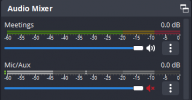
 

Attachments

  • Screenshot 2023-05-26 135752.png
    Screenshot 2023-05-26 135752.png
    7.7 KB · Views: 99
Add a Noise Filter and probably a Limiter Filter

 
OBS has a push-to-talk feature, that connects to a hotkey. If you get used to that, it's a lot better than anything automatic. If you already use that feature in Zoom, then you might even set OBS to use the same key.
 
OBS has a push-to-talk feature, that connects to a hotkey. If you get used to that, it's a lot better than anything automatic. If you already use that feature in Zoom, then you might even set OBS to use the same key.
Thanks for the advice, there's also a push to mute option which is more useful for my situation
 
In OBS Settings > Audio > Global Audio devices, I chose Integrated Mic array.
In Hotkeys > Mic, I set CTRL+M for both mute and unmute (basically a toggle).
Normally record with Mic muted to prevent audio buzz.
When I want to talk in a Zoom meeting, I turn on Zoom audio, then in OBS I type CTRL+M to unmute the Mic. This produces instant noise but doesn't record my voice. What am I don't wrong?
 
...unmute the Mic. This produces instant noise but doesn't record my voice...
So your mic is noisy. The question is, "Why?"

Is the room actually that noisy? Be brutally honest: your ears to a fantastic job of cleaning it up and ignoring the background, while the machine does not.

What about electrical noise that gets into the wiring for the mic? Things like a refrigerator, air conditioner, light dimmer, or even the computer itself.

It might be good to post a recording of that noise. Different problems sound different. A logfile wouldn't hurt too, from the same session that produced that recording. Help -> Log Files -> Upload... Copy/paste the URL that it gives you, both here and into the automated analyzer that you can get to from my signature.
 
OBS has a push-to-talk feature, that connects to a hotkey. If you get used to that, it's a lot better than anything automatic. If you already use that feature in Zoom, then you might even set OBS to use the same key.
How is push-to-talk supposed to work? There isn't a way to reverse it. In Zoom, lifting off the space bar turns the mic off.
 
How is push-to-talk supposed to work? There isn't a way to reverse it. In Zoom, lifting off the space bar turns the mic off.
Zoom might be fixed-function, for all I know. OBS, at least, has both push-to-talk and push-to-mute, which return to the opposite state when you release the hotkey; and both Mute and Unmute functions that remain when you release the hotkey. Assigning the same hotkey to both in a pair, makes it a toggle.
 
Back
Top