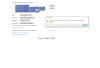
Try the other setting in the drop down box ("Disconnect display" or something like that), so the display #3 icon is shown with a black background in the settings dialog. But under Windows 10 it is usually not necessary to configure a virtual monitor. Quicksync should work out of the box without it. At least it is working without on my desktop system with a i5-3570k CPU which has a HD graphics 4000 onboard and a Nvidia GTX 670. I Updated from Windows 7 to Windows 10 and did not change anything with the Intel display drivers that came with the update. I reinstalled the Nvidia drivers, though, but only to correct the problem that the Nvidia control panel wasn't available after the update.