Please help with constant stuttering in recorded video.

Loftaris

New Member

I've been fighting with stuttering in all my recordings, and it's pretty bad, about every 1-2 seconds it stutters.

I've lowered my FPS to 60 on my desktop, I've set it to admin, set it to high priority in task manager. I simply cannot figure this one out. Please, any assistance is greatly apprecaited!
 
If it helps or not, a recent video I recorded drops frames like this.
Using blender to render the video I see the following where no video is saved, just a frozen frame. This is pre-rendered, using only the save file from OBS:

36:45+22 to 36:45+28(6 frames)
36:46+43 to 36:46+48 (5 frames)
36:47+50 to 36:48+09(59 frames)
36:49+33 to 36:49+38(5 frames)
36:50+40 to 36:50+54(14 frames)

This goes on forever throughout the entire video.
 
Please restart OBS and perform a test stream/recording of no less than 30 seconds doing as you normally do, including playing games, full camera or whatever you normally do.
Look in Help menu. Upload the current log file and paste the url to the log in here. Click on the Analize button to start troubleshooting common issues.
 
Please restart OBS and perform a test stream/recording of no less than 30 seconds doing as you normally do, including playing games, full camera or whatever you normally do.
Look in Help menu. Upload the current log file and paste the url to the log in here. Click on the Analize button to start troubleshooting common issues.
I did this. There was only 1 issue, full color which I changed to partial color. There are no other issues.

I'm not streaming, only recording locally.


I notice that it says the GPU is overloaded by 1.7% ... I'm going to start looking into that. I didn't notice that the first time. If you see anything else I need to fix, let me know. Please and thank you in advance!
 
I realize I made a mistake when I tried the troubleshooting steps. I'm currently remote desktop to my gaming PC, and I realized it was likely taxing my GPU. I ran a new test, disconnected remote desktop, and the GPU error was gone.

I made a few changes that I found on other posts while running these tests (I have new places to look that I didn't before). I found where I can limit my game to a hard 60FPS, so I'll try that. I also fond some optimization settings that I'm going to try as well.

I'll post what I find later to see if it helped. At the moment, I ran a very quick test and it seeeems ok? Hard to say though because it was only the intro screen, so I'll do a more extensive test at home.

Thank you for your time!

https://obsproject.com/logs/mPgUjrarfstG-OnN <-- newest log file without remote desktop
 
Also enable Windows Game Mode as it helps. If by whatever reason makes it worst simple turn it off but for most this helps.
 
Also enable Windows Game Mode as it helps. If by whatever reason makes it worst simple turn it off but for most this helps.
I know the log file contradicts me but it is enabled. Even the regedit has it set to 1 so I'm unsure why it says its disabled.

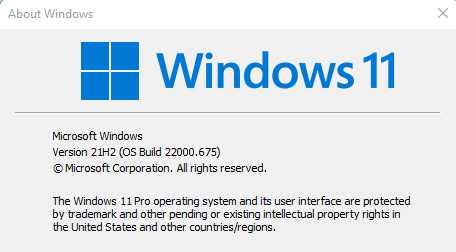
Also, I have Windows 11 not 10 so thats wrong too.


Microsoft Windows
Version 21H2 (OS Build 22000.675)
1654293214195.png


Registry
1654293224922.png


Game Mode On
1654293189462.png
 
Last edited:
Back
Top