


You are using an out of date browser. It may not display this or other websites correctly.
You should upgrade or use an alternative browser.
You should upgrade or use an alternative browser.
Question / Help Please help. Stream buffering every few seconds.
- Thread starter gowfan
- Start date
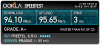
If you have no dropped frames, then it's a problem between twitch and your friends.
I've seen a lot of people have issues watching bitrate 3500 streams on twitch sometimes, even when they have faster internet. Just happens sometimes, might be your friends' ISPs throttling specific traffic at some times of the day, might be twitch throttling because they are tight on upload for a given region at a time.
Personally I notched down my bitrate to 2500 and lowered some settings to be able to use better encoding. (you should consider veryfast encoding preset, it's a lot better than superfast)
I've seen a lot of people have issues watching bitrate 3500 streams on twitch sometimes, even when they have faster internet. Just happens sometimes, might be your friends' ISPs throttling specific traffic at some times of the day, might be twitch throttling because they are tight on upload for a given region at a time.
Personally I notched down my bitrate to 2500 and lowered some settings to be able to use better encoding. (you should consider veryfast encoding preset, it's a lot better than superfast)
Upload and Download see different treatment, as long as you have no dropped frames and your recordings on twich are smooth (once loaded), then twitch is getting your stream properly.
If you have dropped frames you should work on that. (edit: there's a guide somewhere what to check for that, using a different twitch server might be your best bet.)
If not, then it can still help to lower bitrate, or use a proxy to watch, or a different streaming service to broadcast/watch the stream. (hitbox is nice too)
If you have dropped frames you should work on that. (edit: there's a guide somewhere what to check for that, using a different twitch server might be your best bet.)
If not, then it can still help to lower bitrate, or use a proxy to watch, or a different streaming service to broadcast/watch the stream. (hitbox is nice too)
Last edited:

It's an issue with your connection to the Twitch distribution server. It doesn't happen to everyone who watches your stream. You can see if streaming to a different server helps, or lowering your bit rate, but there's not a lot you can do. Again, not everyone who watches your stream will have this problem.