Question / Help Output Settings Stuck on Simple

ck013

New Member
Hey,
I am helping my co-worker set-up obs for streaming to youtube however when we go into his output settings the option to switch the output mode from simple to advanced is stuck on simple and greyed out. How can we fix this we need to change the keyframe intervals and can't.
 
thanks for the quick response but i am afraid I dont understand what you mean by stop the output first.
 
Tools is one of the top level menus in OBS.

It's the menu that houses access to the logfiles, the scene switchers, the auto-config wizard, the output timer, and the NDI and websocket plugins, if you have them.

If you don't have a Tools menu, you're not running OBS Studio, you're likely running SLOBS or the legacy OBS (OBS Classic, no longer supported).
 
Hi, I have this issue too BUT don't have anything to STOP in the Tools drop-downs.

It used to work BUT since I installed NDICAM software on my W7 it doesn't anymore (ie. offer simple or advanced output settings)
 
@MikeFloutier obs-log file may help to find out what is running (replay, recording, streaming, ndi).

NDI install instructions were here:

Forum's part of the NDI plugin (to get more info about):
 
Mike,

Suslik was correct, you need to de-activate your NDI outputs.

12:28:16.186: [obs-ndi] starting NDI main output with name 'OBS'
12:28:16.195: [obs-ndi] 'OBS': ndi output started
12:28:16.195: [obs-ndi] starting NDI preview output with name 'OBS Preview'
12:28:16.197: [obs-ndi] 'OBS Preview': ndi output started
 
Thanks Rockbottom, but as I mentioned, in my Tools drop down there’s no mention of “VirtualCam” plugin AND no mention of “STOP” in NDI
 
There isn't a STOP button, you just need to left click on the checkmarks in the boxes to remove them & then hit OK. You have both the Main & Preview Outputs active.

Tools > NDI Output Settings

Capture.JPG
 
Haha, ok thanks RockBottom, makes me realise what a Newbie I am :)

I assume this -

05:37:35.254: [obs-ndi] 'OBS': ndi output started

- is when the NDI output started?

Out of interest, what was it I did that Started NDI?

PS. Haha, it works! I know you know that BUT it seemed like magic to me, and a relief as I can now point it to where I want to save recordings again - phew! Thanks again.
 
YW!

Yes, so if you forget & leave the boxes checked off, the NDI output will start everytime you open OBS. I don't always use it so I try to make it a point to de-activate it before I close OBS.
 
Many thanks RockBottom, I guess NDI came with tick boxes ticked as default, I didn't notice. I guess they got fed up with newbies like me phoning up asking "why doesn't it worrrrk?" :)
 
Thank you this really helped a lot! I do have a Virtual Cam and I just hit stop, I didn't realized that it was constantly running! I temp turned it off, changed my settings! Thank you!
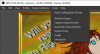
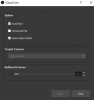
If the OP comes back. Maybe these pics will help?
Tool>Virtual Cam> Stop. Then go to settings and then everything is clickable!
I hope this helps!
 

Attachments

  • Annotation 2020-06-05 220738.png
    Annotation 2020-06-05 220738.png
    151.1 KB · Views: 280
  • Annotation 2020-06-05 220801.png
    Annotation 2020-06-05 220801.png
    10.7 KB · Views: 281
Back
Top