Optimal settings for quickly exporting high quality longform recordings?

DoominalCrossing

New Member
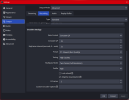
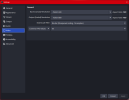
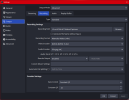
Having multiple issues recording high qulity longform videos for a 1-2 hour long podcast. When hitting "Stop Recording", it takes like 2 hours for the process finish before the file is prepared. Then when I click on the file, the audio progressively increases speed, completely desyncs freom the video, and becomes illegible. I've tried lowering the video quality and that doesn't seem to make a difference so I'm wondering if I'm approaching the whole thing wrong. I've attached my settings below if anyone wants to take a look.

Short form content and 1440p/60 FPS streaming is buttery smooth without issue, just longfrom recorded content.
 

Attachments

  • 01.png
    01.png
    154.3 KB · Views: 18
  • 02.png
    02.png
    139.9 KB · Views: 16
  • 03.png
    03.png
    88.5 KB · Views: 15
The video player that comes with windows isn't good enough. This is why it's recommended to use a more advanced player like VLC.

Start by removing all the unnecessary plugins. You have 50. This is more likely the cause of the 2 hours wait to finally stop the recording.
On OBS less is more. The more things you add to it the more resources consumed and the more issues you'll face.

Set the preset to p5 (I think it's the default value), keep CQ level 20.
Lookahead off
Psycho visual tuning off

Another way is to set the output mode to simple and use recording quality: Indistinguishable... or Lossless


On the audio side, make sure all the sample rates are the same. Notice the last 2. Lowering this to 48KHz should help too. You do this on the Windows audio settings.
OBS Sample Rate: 48000 Hz
SteelSeries Sonar - Microphone (SteelSeries Sonar Virtual Audio Device): 48000 Hz
SteelSeries Sonar - Chat (SteelSeries Sonar Virtual Audio Device): 48000 Hz
SteelSeries Sonar - Media (SteelSeries Sonar Virtual Audio Device): 96000 Hz
SteelSeries Sonar - Gaming (SteelSeries Sonar Virtual Audio Device): 96000 Hz

The idea is to remove all possible causes of issues.

Do a test. This means, start recording for no less than 30 seconds, do as you always do, stop recording. Of course, you should test more than an hour.
 
Back
Top