Hi there,
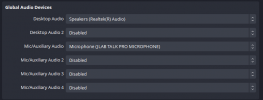
So I have been trying to record streams that have 3 sources of audio (my mic, discord, and the game)
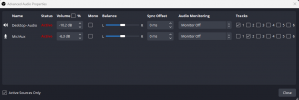
I have all the the audio sources separate and can see in the mixer them working independently, and I have them on separate tracks under the advanced audio properties (everything on 1, just mic on 2, just discord on 3, and just game on 4)
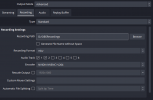
I have the recording settings to record all 4 tracks but for some reason only track 1 is being recorded. When I opened the video with VLC and went through the separate channels, I could hear everything on 1, but 2,3,4 were silent. I tried just having mic on 1 and recorded and could only hear mic, and same with game.
I don't know why only track 1 is being recorded and if anyone could give me some idea I would appreciate it. Thanks ^_^
So I have been trying to record streams that have 3 sources of audio (my mic, discord, and the game)
I have all the the audio sources separate and can see in the mixer them working independently, and I have them on separate tracks under the advanced audio properties (everything on 1, just mic on 2, just discord on 3, and just game on 4)
I have the recording settings to record all 4 tracks but for some reason only track 1 is being recorded. When I opened the video with VLC and went through the separate channels, I could hear everything on 1, but 2,3,4 were silent. I tried just having mic on 1 and recorded and could only hear mic, and same with game.
I don't know why only track 1 is being recorded and if anyone could give me some idea I would appreciate it. Thanks ^_^