


FatKatLOL
New Member
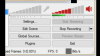
Hi, my name is FatKatLOL, (don't ask why please XD) and I just recently updated to Windows 10. I kinda like except one thing. Microphone won't let me change it's volume. So basically, it's gray and I'm clicking over those towers to change the volume, which does nothing. Basically here's an example:
 and I'm clicking all over those towers doing nothing. I can change the in-game audio though as you can see. So does anyone know how to fix this? I would like to record with commentary and if anyone would find out the remedy the I would be very happy!
Attachments
Last edited:

