Resource icon

OBS-VirtualCam 2.0.4

Can you point out exactly what part needs to manually uninstall?
---------
I have already uninstalled a pluguin but still in obs I have virtualcam options.
I can not find the missing folder which must be removed manually.

any advice?
how to enter commands on windows to find a hidden folder
 
---------
I have already uninstalled a pluguin but still in obs I have virtualcam options.
I can not find the missing folder which must be removed manually.

any advice?
how to enter commands on windows to find a hidden folder
Install default setting should be the following paths.

Here is the obs-plugin part
C:\Program Files (x86)\obs-studio\obs-plugins\32bit\obs-virtualoutput.dll
C:\Program Files (x86)\obs-studio\obs-plugins\64bit\obs-virtualoutput.dll
C:\Program Files (x86)\obs-studio\data\obs-plugins\obs-virtualoutput

And here's the camera part
C:\Program Files (x86)\obs-studio\bin\32bit\obs-virtualsource.dll
C:\Program Files (x86)\obs-studio\bin\64bit\obs-virtualsource.dll

If you still can see the camera on 3rd party software, you should unregister obs-virtualsource.dll before removing them
Run cmd.exe as adminstrator, then type
regsvr32 /u "C:\Program Files (x86)\obs-studio\bin\32bit\obs-virtualsource.dll"
regsvr32 /u "C:\Program Files (x86)\obs-studio\bin\64bit\obs-virtualsource.dll"
 
I did not know how to remove it so I uninstalled the entire obs studio :/
for the future it would be nice for someone to make a video of how to remove this plugin successively.

uninstalling the plugin is not a problem.
(As for the windows) after uninstalling the plugin there will always be a folder that must be removed manually. I speak from my own experience.

in any case thank you for every help :)
 
Hello,
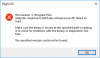
it does not work for me. The installer installation completed without any errors. I also tried manual installation. But it always gives me this error for the 32 bit version. The 64bit version works

regsvr32 "C:\Program Files\obs-studio\bin\32bit\obs-virtualsource.dll"

---------------------------
RegSvr32
---------------------------
The module "C:\Program Files\obs-studio\bin\32bit\obs-virtualsource.dll" failed to load.

Make sure the binary is stored at the specified path or debug it to check for problems with the binary or dependent .DLL files.

The specified module could not be found.
---------------------------
OK
---------------------------


I installed C++ redists mentioned ealier
1535638300341.png


any idea?

Thanks,
Thorben
 

Attachments

  • 1535638214693.png
    1535638214693.png
    11.4 KB · Views: 220
Hello,
it does not work for me. The installer installation completed without any errors. I also tried manual installation. But it always gives me this error for the 32 bit version. The 64bit version works

regsvr32 "C:\Program Files\obs-studio\bin\32bit\obs-virtualsource.dll"

---------------------------
RegSvr32
---------------------------
The module "C:\Program Files\obs-studio\bin\32bit\obs-virtualsource.dll" failed to load.

Make sure the binary is stored at the specified path or debug it to check for problems with the binary or dependent .DLL files.

The specified module could not be found.
---------------------------
OK
---------------------------


I installed C++ redists mentioned ealier
View attachment 39037

any idea?

Thanks,
Thorben

Did you run command with administrator privilege?
And Do you have swscale-4.dll and avutil-55.dll in your 32bit directory?
If you have delete them once before, please reinstall obs to get 32-bit component.
 
Hi,
yes, all commands with administrator (run as administrator) cmd
no, not in the 32bit directoy. I did not delete them. both dlls exist only in the 64bit directory
re-installation of OBS did not help.

steps to fix:
- downloaded the 32bit version of OBS manually
- extract the OBS-Studio-22.0.1-Full-Installer-x86.exe
- create 32bit folder C:\Program Files\obs-studio\bin\32bit
- manually copy swscale-4.dll and avutil-55.dll to that folder
- run the OBS-VirtualCam2.0.1-Installer.exe

Thanks for your help,
Thorben
 
Hi,
yes, all commands with administrator (run as administrator) cmd
no, not in the 32bit directoy. I did not delete them. both dlls exist only in the 64bit directory
re-installation of OBS did not help.

steps to fix:
- downloaded the 32bit version of OBS manually
- extract the OBS-Studio-22.0.1-Full-Installer-x86.exe
- create 32bit folder C:\Program Files\obs-studio\bin\32bit
- manually copy swscale-4.dll and avutil-55.dll to that folder
- run the OBS-VirtualCam2.0.1-Installer.exe

Thanks for your help,
Thorben
Oh... seems the new obs installer only install 64-bit now, That's a bad news for me. I have to modify the instruction.
Thanks for your reply anyway.
 
Will this plugin ever work with Skype (v.8x)? I have Skype 8.29 (Desktop), MS is going to force users to stop using v.7.40 (the OBS plugin didn't work for me there either). TriDef SmartCam and SparkoCam are working fine there, why not the OBS-camera?
Andrew
 
Will this plugin ever work with Skype (v.8x)? I have Skype 8.29 (Desktop), MS is going to force users to stop using v.7.40 (the OBS plugin didn't work for me there either). TriDef SmartCam and SparkoCam are working fine there, why not the OBS-camera?
Andrew
It might be the same issue due to the lack of 32-bit ffmpeg component .
I am working on it , right now you can download obs-studio x86 installer or wait for update.
 
Sorry to hear about your accident. Hopefully nothing major?
I managed to make the OBS-VirtualCam2.0.1 plugin work with Skype 8.29 and OBS 64-bit, by copying various bits and pieces from the OBS x86 installer (ZIP) into a manually created C:\Program Files (x86)\obs-studio\ . I probably copied too much - I don't know now which files were vital for it to work. Important: re-running the VirtualCam installer on top of the already installed plugin didn't do the job, but when I uninstalled the plugin (but not OBS itself), and re-run the installer it worked fine.
It wold be nice to have it all in the 64-bit installer. Get well soon, and many thanks for a quick respons and the tip.
 
I've made right now a fresh installation of OB Virtual Cam, on OBS 22.0.2, but from Skype (8.30.76.22 version) is not visible.
on OBS: Tools > Virtual Cam and a window opens and I select the first of the 4 OBS Cameras proposed ... I click on Start and I close the window
on SkyPe: Settings > Audio & Video > Camera ut when I open I have not OBS.
 
I've made right now a fresh installation of OB Virtual Cam, on OBS 22.0.2, but from Skype (8.30.76.22 version) is not visible.
on OBS: Tools > Virtual Cam and a window opens and I select the first of the 4 OBS Cameras proposed ... I click on Start and I close the window
on SkyPe: Settings > Audio & Video > Camera ut when I open I have not OBS.
All fresh install with obs-studio 22 have this 32bit ffmpeg component issue, please see the above discussion to find the workaround way or wait for next update.
 
Back
Top