
OBS occasionally fails to capture the monitor

DaintWSQ

New Member
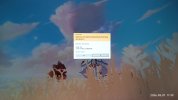
I need help, very grateful,OBS seems to have triggered some bugs, causing my saved recordings to be completely static desktop wallpaper throughout the playback, and there is a layer of black filter on the wallpaper, just like when opening an application that requires administrator privileges (secure desktop). The entire playback is just the wallpaper, unable to capture the screen, with only the audio working normally.Just like in Figure 1, except without the middle prompt box.

The log can only show the time when the bug was triggered. After saving the last valid replay at 6:26, errors started at 6:36. Each failed frame recording counts as an error, with a total of 1.47 million errors. The error code means that the DirectX call is invalid, and the specific reason is still unknown.

This bug is very easy to fix—just restarting OBS can solve it—but by the time I discover this bug, there's a high chance that important replay files have already been lost. How can I prevent this bug from occurring? If it’s hard to prevent, is there any plugin that can monitor the recording status in OBS and immediately alert me when a recording error occurs? After all, the logs can track the bug.

The above content is machine-translated, please bear with me. This problem is bothering me a lot, and I am afraid of triggering this bug again and losing the replay files. Thank you very much!
 

Attachments

  • Image_1778147736630.jpg
    Image_1778147736630.jpg
    107.1 KB · Views: 12
  • X_EJ{)5(7@[T(IJ)1]6``KO.png
    X_EJ{)5(7@[T(IJ)1]6``KO.png
    30.3 KB · Views: 10
You should have searched that error. Looks like it may be your driver flaking out or it may be conflicted.

This error in OBS Studio typically occurs when there's an issue with capturing the screen, often related to graphics drivers or display settings. It may require updating drivers or adjusting capture settings.
GitHub obsproject.com

Understanding the Error​

The error message "gs_duplicator_update_frame: Failed to update frame (887A0001)" in OBS Studio indicates a problem with the Monitor Capture feature. This issue often arises when the application is trying to capture a screen while in exclusive fullscreen mode, particularly during gaming.

Common Causes​

  • Graphics Driver Issues: Outdated or incompatible graphics drivers can lead to capture failures.
  • Fullscreen Mode: The error tends to occur when switching to fullscreen mode or when alt-tabbing between applications.
  • OBS Settings: Incorrect settings in OBS can also contribute to this error.

Solutions to Resolve the Error​

Here are some steps to troubleshoot and potentially fix the issue:
SolutionDescription
Update Graphics DriversEnsure that your graphics drivers are up to date. Visit the manufacturer's website for the latest versions.
Change Capture MethodSwitch from Monitor Capture to Window Capture or Game Capture, which may work better in certain scenarios.
Reset Monitor CaptureIf the error occurs, reset the Monitor Capture by changing the scene collection or re-adding the capture source.
Adjust OBS SettingsCheck the settings in OBS, particularly those related to capture methods and performance.
Run OBS as AdministratorRunning OBS with elevated permissions can sometimes resolve capture issues.

Additional Tips​

  • Test Different Games: Some games may trigger this error more frequently. Testing with various titles can help identify if the issue is game-specific.
  • Monitor Capture Refresh: If the error occurs, toggling the mouse capture option can refresh the Monitor Capture and resolve the issue temporarily.
By following these steps, you should be able to address the "gs_duplicator_update_frame" error and improve your screen capture experience in OBS Studio.

Some observations from your log:
Windows appears to be stale.
Use the MS anti-virus & firewall
OBS is @ 120FPS
Uncheck scaling on the encoding tab
Rendering Lag is GPU overload.
16:52:01.492: Output '回放缓存': Total drawn frames: 5285514 (5285819 attempted)
16:52:01.492: Output '回放缓存': Number of lagged frames due to rendering lag/stalls: 305 (0.0%)
16:52:01.492: Video stopped, number of skipped frames due to encoding lag: 305/5285819 (0.0%)

 
I knew I saw this line but couldn't locate it on the last post. Not sure if this is being blocked by the anti-virus in play or if something else is going on?

11:42:57.877: Loading branches from file failed: Opening file failed.
 
You should have searched that error. Looks like it may be your driver flaking out or it may be conflicted.

This error in OBS Studio typically occurs when there's an issue with capturing the screen, often related to graphics drivers or display settings. It may require updating drivers or adjusting capture settings.
GitHub obsproject.com

Understanding the Error​

The error message "gs_duplicator_update_frame: Failed to update frame (887A0001)" in OBS Studio indicates a problem with the Monitor Capture feature. This issue often arises when the application is trying to capture a screen while in exclusive fullscreen mode, particularly during gaming.

Common Causes​

  • Graphics Driver Issues: Outdated or incompatible graphics drivers can lead to capture failures.
  • Fullscreen Mode: The error tends to occur when switching to fullscreen mode or when alt-tabbing between applications.
  • OBS Settings: Incorrect settings in OBS can also contribute to this error.

Solutions to Resolve the Error​

Here are some steps to troubleshoot and potentially fix the issue:
SolutionDescription
Update Graphics DriversEnsure that your graphics drivers are up to date. Visit the manufacturer's website for the latest versions.
Change Capture MethodSwitch from Monitor Capture to Window Capture or Game Capture, which may work better in certain scenarios.
Reset Monitor CaptureIf the error occurs, reset the Monitor Capture by changing the scene collection or re-adding the capture source.
Adjust OBS SettingsCheck the settings in OBS, particularly those related to capture methods and performance.
Run OBS as AdministratorRunning OBS with elevated permissions can sometimes resolve capture issues.

Additional Tips​

  • Test Different Games: Some games may trigger this error more frequently. Testing with various titles can help identify if the issue is game-specific.
  • Monitor Capture Refresh: If the error occurs, toggling the mouse capture option can refresh the Monitor Capture and resolve the issue temporarily.
By following these steps, you should be able to address the "gs_duplicator_update_frame" error and improve your screen capture experience in OBS Studio.

Some observations from your log:
Windows appears to be stale.
Use the MS anti-virus & firewall
OBS is @ 120FPS
Uncheck scaling on the encoding tab
Rendering Lag is GPU overload.
16:52:01.492: Output '回放缓存': Total drawn frames: 5285514 (5285819 attempted)
16:52:01.492: Output '回放缓存': Number of lagged frames due to rendering lag/stalls: 305 (0.0%)
16:52:01.492: Video stopped, number of skipped frames due to encoding lag: 305/5285819 (0.0%)

Thank you very much for your help. I will try everything you suggested.

It seems that this bug is really difficult to completely fix. The probability of it occurring is extremely low, and I have exhausted all methods but still cannot reproduce it, so I cannot be sure whether the changes I made are effective. You are right, at the time the bug appeared, I had changed the game's graphics settings, certainly switched screens, and a friend had connected to me remotely through Parsec, etc. I am not sure which action triggered this bug.

I asked a friend to write a script that can monitor the log files for error keywords. Perhaps this method can tell me which action caused the bug the next time it occurs, and I will also reply in that post at that time.
 
Back
Top