

You are using an out of date browser. It may not display this or other websites correctly.
You should upgrade or use an alternative browser.
You should upgrade or use an alternative browser.
OBS not wanting to make my video 144 fps, it makes the video 60 fps instead, on both preview AND video
rockbottom
Active Member
We know there's something not right at least with AV1, probably the Nvidia driver but hard to say for sure. Needs further testing.
The iGPU is still enabled, that may or may not be the issue but you won't know until a test is done with it disabled.
In the meantime, run @ 60. Make sure the preview is stable at all times while playing.
The iGPU is still enabled, that may or may not be the issue but you won't know until a test is done with it disabled.
In the meantime, run @ 60. Make sure the preview is stable at all times while playing.
rockbottom
Active Member
I my BIOS, I set my 3090 (pci-e) as Primary & then I'm able to just enable or disable the iGPU. Simple. I'm not exactly sure how your BIOS is laid out, every manufacturer is different.
Does this iGPU have other names? Because I really cant find anything relating to iGPU in my opinion..I my BIOS, I set my 3090 (pci-e) as Primary & then I'm able to just enable or disable the iGPU. Simple. I'm not exactly sure how your BIOS is laid out, every manufacturer is different.
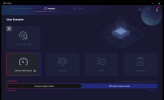
rockbottom
Active Member
AMD Radeon(TM) 680M
So my BIOS goes like this, the hardest part is remembering where the menu is located:
Main Menu > Advanced Menu > System Agent (SA) Config > Graphics Config
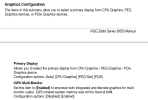
No Hybrid, Discreet only
So my BIOS goes like this, the hardest part is remembering where the menu is located:
Main Menu > Advanced Menu > System Agent (SA) Config > Graphics Config
No Hybrid, Discreet only
The only options i have inside the advanced menu areAMD Radeon(TM) 680M
So my BIOS goes like this, the hardest part is remembering where the menu is located:
Main Menu > Advanced Menu > System Agent (SA) Config > Graphics Config
View attachment 109058
No Hybrid, Discreet only
1. BACKSLASH/ALT Key Swap
2. Network Stack
3. SVM Mode
4. User Scenario
5. Allow BIOS Downgrade
i saw some videos on the bios of my exact model but they had more options than mine in the advanced menu.. is it maybe because of an outdated bios or?
rockbottom
Active Member
Yeah, no layout is identical. Check for a User/BIOS manual on the support page for your laptop/mobo.
Well i finally found the iGPU option, but after I disabled it, am now stuck in a bootloop. My laptop tries to use its automatic repair system but fails each time. I can enter into the BIOS but after I select the bootup it just does the bootloop all over again..Yeah, no layout is identical. Check for a User/BIOS manual on the support page for your laptop/mobo.
rockbottom
Active Member
How about the 4050, did you double check it's BIOS setting & adjust if needed? Sounds like the system is looking for the iGPU instead of it.
rockbottom
Active Member
Is this your laptop?
My laptop is an MSI Bravo 15 C7VEKIs this your laptop?
idk how am i gonna reset the bios settings to default tho, i cant even access bios anymore


Suslik V
Active Member
Usually, users read the manual in a search for the word "reset". Support page of the PC manufacturer usually provides manual for the device in digital form. Sometimes, the option is used after the firmware update, so you may look at "firmware" sections too. If you are not sure that you can do it right - try to ask local tech support from someone who is tech savvy....idk how am i gonna reset the bios settings to default tho, i cant even access bios anymore
hey guys, so i was able to recover my laptop (i did not go to a mechanic), and in the meantime i managed to solve the problem as well
i stumbled upon this video where i tried to use the suggestions as if my problem classified as a 'stutter' problem https://www.youtube.com/watch?v=eubBwFxWwzc&list=LL&index=1
i set my refresh rate to 143.999 and set the capture method of my display capture to DXGI and it worked!
i tried keeping my refresh rate of 144 but changing the capture method to DXGI, it did improve by a lot but not as well as setting the refresh rate to 143.99
i dont know if thatll fix my issue temporarily or more issues will arise because of this.. but it did fix the problem for now
i stumbled upon this video where i tried to use the suggestions as if my problem classified as a 'stutter' problem https://www.youtube.com/watch?v=eubBwFxWwzc&list=LL&index=1
i set my refresh rate to 143.999 and set the capture method of my display capture to DXGI and it worked!
i tried keeping my refresh rate of 144 but changing the capture method to DXGI, it did improve by a lot but not as well as setting the refresh rate to 143.99
i dont know if thatll fix my issue temporarily or more issues will arise because of this.. but it did fix the problem for now
rockbottom
Active Member
Cool you found the reset. Info on page 2-11 of the manual. Was it by the battery or on the power key?
Interesting about the capture method with Roblox, I'll keep it in mind.
Interesting about the capture method with Roblox, I'll keep it in mind.
Cool you found the reset. Info on page 2-11 of the manual. Was it by the battery or on the power key?
Interesting about the capture method with Roblox, I'll keep it in mind.
I managed to reset it by removing and putting the circular battery back in place, it was tough because that was the first time I opened a laptop..
Also, keep in mind that this 60 fps problem was an issue affecting the entirety of the footage and not just Roblox. I just remembered that Roblox does support Window capture, but it repeated the same issue I was facing. Switching to DXGI fixed my problem for now but don’t really know why..
I also tried switching to DXGI before but the screen was pitch black..
So I’m guessing that I already had been using DXGI instead of the Windows 10 capture method automatically, until something happened to the DXGI Capture method, causing it to show no output and just a black screen, so then it automatically switched to Windows 10, which was incompatible and caused this whole issue for me.
Also, thank you and the others for helping me out, I got a real headache from this stupid issue lmao.
rockbottom
Active Member
YW!
Look for the battery reset hole next time, you won't have to pull the battery if it hangs again or you do a BIOS update. Insert end of a paper clip, push the button for 10 seconds & you're set.
Not sure, I haven't had any issues with the W10 method.
Look for the battery reset hole next time, you won't have to pull the battery if it hangs again or you do a BIOS update. Insert end of a paper clip, push the button for 10 seconds & you're set.
Not sure, I haven't had any issues with the W10 method.