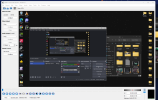
OBS not wanting to make my video 144 fps, it makes the video 60 fps instead, on both preview AND video

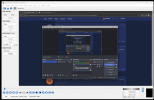
this is what it looks like before i record

i move the window and my mouse, and the preview makes it seem like a footage thats 60 fps, rather than 144 fps. the preview is not smooth at all compared to what i used to clip a while ago. YET at the bottom right, it says its recording at 144 fps, so i dont even understand why this is going on
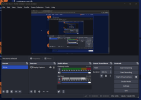
 

Attachments

  • 1730898635352.png
    1730898635352.png
    97.9 KB · Views: 34
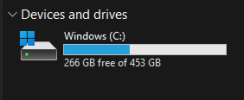
OBS isn't causing your issue, your laptop or settings are. I'm kinda thinking there may be some thrashing going on. System only has 16GB of RAM & you're writing to your OS drive. If that drive is getting full/near full, performance will slowly degrade.
i tried recording at very low settings and the issue is still there

is it maybe because i keep my laptop on its A-game and not giving it rest?
 
my RAM currently is 46% so even if i have nothing on besides obs, shouldnt it at least show 144 fps while having nothing on besides the recorder?
 
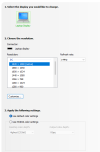
i sadly dont have a 120z option for my monitor, i looked in both nvidia control panel and the windows settings.. the only other option i have is 60hz

also which drive? the C:?
 

Attachments

  • 1730899592017.png
    1730899592017.png
    30.2 KB · Views: 36
  • 1730899630261.png
    1730899630261.png
    19.1 KB · Views: 33
Hopefully things runs smooth @ 60, if not easier to troubleshoot. Once 60 is stable, we can try to figure out why the high refresh rates aren't doing so good
 
I'm going to need a complete log.

Make system updates with OBS closed.

Make updates to OBS & then close it.

Re-open & run your test. When finished close/re-open OBS & post the previous log.
 
I have a 3090, can't test AV1. Wondering what's up with the Keyframe setting? 288? I get it's the frames but H264 & H265 show the setting in seconds. Avidemux gives the frame type info. Throw one of your recordings in it & see if the I Frames are actually 2 seconds apart.

https://avidemux.sourceforge.net/

1730901192362.png
 
I'm going to need a complete log.

Make system updates with OBS closed.

Make updates to OBS & then close it.

Re-open & run your test. When finished close/re-open OBS & post the previous log.
Okay so I did everything you requested for.


1) The storage has more than 25% of free space.

2) I recorded and tested the new video, it looks like an ordinary 60 fps video since it is set to 60 fps so that means its stable.
Log file: https://obsproject.com/logs/0XByVFrfOQOXPDRd

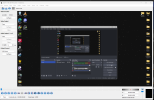
3) I downloaded the program you were talking about, and the frame type came up to me as I-Frame. I do not really know the program and those techy stuff so check out the photo I attached that shows what popped up for me when I inserted that 60 fps video that you recently requested.
 

Attachments

  • Screenshot 2024-11-06 175905.png
    Screenshot 2024-11-06 175905.png
    342.6 KB · Views: 32
  • Screenshot 2024-11-06 174511.png
    Screenshot 2024-11-06 174511.png
    4.6 KB · Views: 34
Last edited:
Look at where the pointer is in Avidemux, it's not at the beginning of the file. If that's the first available I frame, the recording is bad.
1730907427138.png


Try recording using H265, encoding settings are the same. You can 0 B Frames & uncheck visual tuning. B Frames are the lowest quality frame type.
 
Last edited:

Attachments

  • 1730908197665.png
    1730908197665.png
    391 KB · Views: 38
For comparison. I cut/remuxed a file to 1:17:xx. The pointer is located on the 2nd I-frame in the recording (2 seconds).
1730908223240.png
 
Touch of rendering lag. How does the recording look now, any improvement?

Drop your monitor/OBS to 120 for the next test & set the Keyframe interval to 1 second.
 
Touch of rendering lag. How does the recording look now, any improvement?

Drop your monitor/OBS to 120 for the next test & set the Keyframe interval to 1 second.
ehhh i mean not much of improvement but i think it did improve by a very small bit, or maybe am going crazy lmao

but i cant set my monitor to 120 remember? or do u mean i should only set OBS to 120?
 
Back
Top