OBS is taking up most of my computer memory, lagging on startup and while streaming

Roozie

New Member
OBS has been running fine with no problems earlier this year. But now the past month, it's been lagging up my PC and taking up a lot of my memory. In the screenshot it goes up from around 50% to over 90%. I tried turning the bitrate down, setting the process priority to "high" and "above normal", removing some plugins and sources, and closing apps. But it's still taking up all my memory and lagging my PC whenever I stream and whenever I launch the program.

I've been running OBS for years with 16gb (2x8gb) of RAM and there was no lag problem at all. So I don't know what the issue is now. I am considering getting bigger RAM. I still have a DDR4 and I'm trying to see if there's an affordable one with more gb available, since I know RAM is getting very expensive.

But please help me out if there's any other way to fix this problem before I start getting bigger RAM.

 

Attachments

  • 2025-12-12 17-41-19.txt
    133.7 KB · Views: 10
  • 2025-12-12 20-27-22.txt
    134.8 KB · Views: 4
  • 2025-12-12 20-59-20.txt
    141.2 KB · Views: 6
  • Screenshot 2025-12-12 211541.jpg
    Screenshot 2025-12-12 211541.jpg
    23.7 KB · Views: 7

FiftyNut

New Member
Do you recently update OBS or Windows? Sounds like a memory leak from a update or patch. Try and revert to a previous version and see if that works.
 

Roozie

New Member
Do you recently update OBS or Windows? Sounds like a memory leak from a update or patch. Try and revert to a previous version and see if that works.
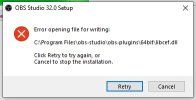
It's not letting me install the previous versions for this reason.
 

Attachments

  • Screenshot 2025-12-13 010804.jpg
    Screenshot 2025-12-13 010804.jpg
    18.4 KB · Views: 10

rockbottom

Active Member
I'm not wasting my time checking all of your plugins but here's some low hanging fruit.....

17:41:22.570: [NVIDIA VIDEO FX]: NVIDIA VIDEO FX version: 0.7.2.0
17:41:22.570: [NVIDIA VIDEO FX]: NVIDIA VIDEO Effects SDK is outdated. Please update both audio & video SDK.
17:41:23.518: [NVIDIA VIDEO FX]: SDK loaded but old redistributable detected. Please upgrade.
17:41:23.587: [NVIDIA VIDEO FX]: enabled, redistributable found
 

rockbottom

Active Member
Source(s) are lagging....

I would do all my testing with a new Scene Collection, add just (1) Source. You can go back & clean up the old collection later.

Tick_sources: min=0.001 ms, median=1.464 ms, max=3899.78 ms, 99th percentile=36.9 ms
 

rockbottom

Active Member
I've looked at thousands of logs, this is something I've never seen before. It's in the 2nd log.

20:57:47.281: Not all sources were cleared when clearing scene data:
20:57:47.281:
20:57:47.281: - what dmca friendly
20:57:47.281: - Audience
20:57:47.281: - Flashbang
20:57:47.281: - yep thats me soundbit
20:57:47.281: - Text (GDI+) 12
20:57:47.281: - Media Source 12
20:57:47.281: - death reason
20:57:47.281: - ilmtxt 2
20:57:47.281: - BadBoysBeehar
20:57:47.281: - Color Source
20:57:47.281: - what txt
20:57:47.281: - Gnome
20:57:47.281: - Michael Rosen Nice (69)
20:57:47.281: - Toasty Roozie
20:57:47.281: - Media Source 9
20:57:47.281: - Speed lines
20:57:47.281: - salamander in the wild
20:57:47.281: - Sad music
20:57:47.281: - Snap
20:57:47.281: - Closed Captions
20:57:47.281: - Music Audio
20:57:47.281: - Display Capture
20:57:47.281: - Video Capture Device
20:57:47.281: - Microphone
20:57:47.281: - Desktp Audio
20:57:47.281: - Window Capture
20:57:47.281: - Twitch Alerts (hype train)
20:57:47.281: - modtts
20:57:47.281: - rhiworm
20:57:47.281: - Image 5
20:57:47.281: - what sound
20:57:47.281: - Triggerfyre
20:57:47.281: - Explode
20:57:47.281: - Dirt Sas
20:57:47.281: - To be continued
20:57:47.281: - Rambley looks at you
20:57:47.281: - CrashNote
20:57:47.281: - tbc color
20:57:47.281: - Broken screen
20:57:47.281: - Gnome 2
20:57:47.281: - Gnome 3
20:57:47.281: - Gnome 4
20:57:47.281: - Gnome 5
20:57:47.281: - Color Source 36
20:57:47.281: - THX bingus
20:57:47.281: - robot rock
20:57:47.281: - Color Source 25
20:57:47.281: - That was terrible
20:57:47.281: - Absolutely not
20:57:47.281: - u want sum fuk
20:57:47.281: - Crash screen 1
20:57:47.281: - daily sub goal
20:57:47.281: - sub with prime
20:57:47.281: - Tiltify
20:57:47.281: - Tangia
20:57:47.281: - christmas lights
20:57:47.281: - You just got burm'd
20:57:47.281: - bits gif 2
20:57:47.281: - Peter Griffin Dance
20:57:47.281: - turtle hype
20:57:47.281: - nice cock
20:57:47.281: - you can't say that
20:57:47.281: - bits txt
20:57:47.281: - shelf txt 3
20:57:47.281: - roozieFear
20:57:47.281: - scaretxt
20:57:47.281: - Can you play the game
20:57:47.281: - Play the game rn
20:57:47.281: - GET ON WITH IT
20:57:47.281: - Sound Alerts
20:57:47.281: - DISCO LIGHTS
20:57:47.281: - Blerp
20:57:47.281: - Giant emote
20:57:47.281: - Discord Group
20:57:47.281: - YouTube Music Player
20:57:47.281: - BOOOOOO
20:57:47.281: - MGS ALERT
20:57:47.281: - Color bars
20:57:47.281: - Explode 1
20:57:47.281: - Explode 2
20:57:47.281: - Explode 3
20:57:47.281: - Explode 4
20:57:47.281: - Explode 5
20:57:47.281: - me wiggle
20:57:47.281: - family guy background
20:57:47.281: - SPARKLIGHT
20:57:47.281: - you what
20:57:47.281: - no swearing
20:57:47.281: - lasagna
20:57:47.281: - everyonelikedthat
20:57:47.281: - Color Source 8
20:57:47.281: - likedthat txt
20:57:47.281: - xbox360visuals
20:57:47.281: - bagels
20:57:47.281: - no way
20:57:47.281: - outer wilds
20:57:47.281: - starting countdown
20:57:47.281: - rain
20:57:47.281: - Image 10
20:57:47.281: - picture caption
20:57:47.281: - flash
20:57:47.281: - Fullscreen Chat
20:57:47.281: - Short chat
20:57:47.281: - bridges
20:57:47.281: - space background
20:57:47.281: - Twitch and YT notif
20:57:47.281: - Stream Audio
20:57:47.281: - crumpets 4 scrumpets
20:57:47.281: - LIZARD
20:57:47.281: - roozie gif tuber
20:57:47.281: - rooziePop
20:57:47.281: - Spotify Player
20:57:47.281: - Controller Overlay
20:57:47.281: - what do txt
20:57:47.281: - gigarooz
20:57:47.281: - alerts status
20:57:47.281: - Color Source 6
20:57:47.281: - falling confetti
20:57:47.281: - tw1
20:57:47.281: - tw2
20:57:47.281: - BINGO CARD
20:57:47.281: - roozie as logo
20:57:47.281: - Joe Hendry
20:57:47.281: - dubby ad
20:57:47.281: - lofi background
20:57:47.281: - sherma
20:57:47.281: - roozie axolotl
20:57:47.281: - legendary txt
20:57:47.281: - mythical txt
20:57:47.281: - sub name
20:57:47.281: - sub reason
20:57:47.281: - Text (GDI+) 3 5
20:57:47.281: - Text (GDI+) 3 3
20:57:47.281: - Text (GDI+) 3 3 2
20:57:47.281: - Color Source 7
20:57:47.281: - follower goal
20:57:47.281: - TV Edge
20:57:47.281: - imabug
20:57:47.281: - BOO
20:57:47.281: - sub goal
20:57:47.281: - Text (GDI+) 2
20:57:47.281: - static
20:57:47.281: - stream intro
20:57:47.281: - Confetti
20:57:47.281: - absolute cinema txt
20:57:47.281: - Starting soon vid
20:57:47.281: - Side cam
20:57:47.281: - Text (GDI+) 4 2
20:57:47.281: - Color Source 3
20:57:47.281: - Text (GDI+) 4 2 2
20:57:47.281: - Media Source
20:57:47.281: - Text (GDI+) 4 2 2 2
20:57:47.281: - Hide screen
20:57:47.281: - Freeze fullscreen
20:57:47.281: - Audio
20:57:47.281: - Alerts
20:57:47.281: - Group
20:57:47.281: - Gameplay freeze
20:57:47.281: - Fullscreen freeze
20:57:47.281: - Shelf cam
20:57:47.281: - turtle dance
20:57:47.281: - Zoom in screen
20:57:47.281: - Jumpscare counter
20:57:47.281: - bits alert
20:57:47.281: - Visuals
20:57:47.281: - Everyone liked that
20:57:47.281: - blurred wiggle
20:57:47.281: - Background change
20:57:47.281: - Fullscreen Cry
20:57:47.281: - Gameplay Cry
20:57:47.281: - Picture taken
20:57:47.281: - Group 6
20:57:47.281: - Group 6 2
20:57:47.281: - Group 6 3
20:57:47.281: - info screen
20:57:47.281: - trigger warning
20:57:47.281: - Double whammy
20:57:47.281: - Display Screens
20:57:47.281: - sub retro
20:57:47.281: - TV Screen
20:57:47.281: - TV Cam
20:57:47.281: - goals
20:57:47.281: - Chroma Cam
20:57:47.281:
 

PaiSand

Active Member
It's a clear case of too many. Too many plugins, too many scripts, too many filters, too many scene / sources
I don't know if any system with any amount of RAM can manage all this without issues.
 

rockbottom

Active Member
Thx Pai, I skipped the RAM in the log since OP stated above there's 16GB but there appears to be a stick missing.

20:59:40.219: Physical Memory: 8043MB Total, 3677MB Free
 

Roozie

New Member
It's a clear case of too many. Too many plugins, too many scripts, too many filters, too many scene / sources
I don't know if any system with any amount of RAM can manage all this without issues.
That can't be the problem. Because it has managed with that amount of sources and filters before in the past.
 

Roozie

New Member
I'm not wasting my time checking all of your plugins but here's some low hanging fruit.....

17:41:22.570: [NVIDIA VIDEO FX]: NVIDIA VIDEO FX version: 0.7.2.0
17:41:22.570: [NVIDIA VIDEO FX]: NVIDIA VIDEO Effects SDK is outdated. Please update both audio & video SDK.
17:41:23.518: [NVIDIA VIDEO FX]: SDK loaded but old redistributable detected. Please upgrade.
17:41:23.587: [NVIDIA VIDEO FX]: enabled, redistributable found
Updated all of the NVIDIA video and audio SDKs. Still the same result.
 

qhobbes

Active Member
RAM with 32.0.4, 2 plugins, 1080 canvas, 60 fps, 1 scene, no sources
obs-ram-no-sources-no-preview-min.png

RAM with 32.0.4, 2 plugins, 1080 canvas, 60 fps, 1 scene, 2 1080p 60 fps video capture sources, 1 filter, text and color source
obs-ram-2-cam-sources-no-preview-min.png

Sources and filters clearly use RAM. Those were both measured when the preview was disabled and minimized to the tray.
 
Top