Hello guys!
I'm pretty new at streaming, I'm streaming with OBS at Twitch.TV when I play Counter-Strike: GO but I don't know how to find the best settings for me. So I have some questions
1. I prefer nvidia nvec before x264, due to better fps-performance, is this a bad choice?
2. 30 or 60 fps? Does it get more buffering for my viewers if I choose 60fps over 30fps?
3. I have found my stream pretty buffering for many If I go with too high bitrate, so I have choosen to put it around 2000-2100, is it better to go with 30 fps with this?
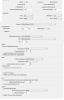
4. If I go with NVIDIA NVEC, what advanced settings shall I use? Right now I have the pre-setting @ "High Performance" and code profile @ main.
What is your tips? I would appriciate your help my friends!
Thank you
Some PC specs if you want:
GFX: MSI GeForce GTX 970 Gaming 4GB
MOBO: Gigabyte Z97X Gaming 7
CPU: Intel Core i7 4790k @ 4Ghz
I'm pretty new at streaming, I'm streaming with OBS at Twitch.TV when I play Counter-Strike: GO but I don't know how to find the best settings for me. So I have some questions
1. I prefer nvidia nvec before x264, due to better fps-performance, is this a bad choice?
2. 30 or 60 fps? Does it get more buffering for my viewers if I choose 60fps over 30fps?
3. I have found my stream pretty buffering for many If I go with too high bitrate, so I have choosen to put it around 2000-2100, is it better to go with 30 fps with this?
4. If I go with NVIDIA NVEC, what advanced settings shall I use? Right now I have the pre-setting @ "High Performance" and code profile @ main.
What is your tips? I would appriciate your help my friends!
Thank you
Some PC specs if you want:
GFX: MSI GeForce GTX 970 Gaming 4GB
MOBO: Gigabyte Z97X Gaming 7
CPU: Intel Core i7 4790k @ 4Ghz