Hi People
Im having trouble setting it up the best way. Have an fx-8350 processor and r9-280x gpu.
some people say that fx-8350 is an okay god cpu for streaming, but when I use the h.264 my fps i csgo drops to like 80-90 fps. Normally its 170-200 fps. Have i 144mhz monitor, so it would be nice that I could use it in the mhz that it can do.
Ive tried the vce in OBS it works better, but OBS will stop after som time and get a fail whit the screen driver.
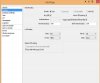
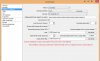
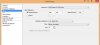
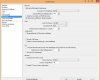
OBS settings:
bitrate 1500-2200
downscale to 960x720
fps:30
cpu preset: veryfast
Can anyone help me to get the best out of my current hardware?
Im having trouble setting it up the best way. Have an fx-8350 processor and r9-280x gpu.
some people say that fx-8350 is an okay god cpu for streaming, but when I use the h.264 my fps i csgo drops to like 80-90 fps. Normally its 170-200 fps. Have i 144mhz monitor, so it would be nice that I could use it in the mhz that it can do.
Ive tried the vce in OBS it works better, but OBS will stop after som time and get a fail whit the screen driver.
OBS settings:
bitrate 1500-2200
downscale to 960x720
fps:30
cpu preset: veryfast
Can anyone help me to get the best out of my current hardware?