You are using an out of date browser. It may not display this or other websites correctly.
You should upgrade or use an alternative browser.
You should upgrade or use an alternative browser.
my obs doesn't recognize my graphic card
- Thread starter Hajit
- Start date

qhobbes
Active Member
Please specify your graphics card and
Please post a log with your issue! Here's how...
OBS Studio creates a log file each time you run it which contains very useful diagnostic information. Without a log file, it's much harder for any support volunteers to figure out problems and your post may be ignored. To upload a log file, go to the Help menu > Log Files > Upload Last Log...
obsproject.com
It doesn't show me the graphics to choose, that's the problemPlease specify your graphics card and
Please post a log with your issue! Here's how...
OBS Studio creates a log file each time you run it which contains very useful diagnostic information. Without a log file, it's much harder for any support volunteers to figure out problems and your post may be ignored. To upload a log file, go to the Help menu > Log Files > Upload Last Log...obsproject.com
I recently changed Windows and after changing Windows, this problem occurred. The drivers are fully installedIt doesn't show me the graphics to choose, that's the problem

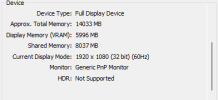
In the Windows search box, type "dxdiag" and press enter. Go to the Display tab. What is the Name of the Device listed there?
Attachments

Suslik V
Active Member
It shouldn't. Switch mode back to "Type: Standard"....my obs doesn't recognize my graphic card in custom output mod
If OBS running on build in graphics - hardware encoder will be unavailable for you. For details:
Laptop? Black screen when capturing? Read here first.
Depending on your Windows version and what sources you wish to use, you may need to set OBS to run on a specific GPU. Not sure which Windows version you have? Press Windows+R and run "winver". For Windows 10 1909 or newer: Open Settings and search for "Graphics Settings". Select "Classic App"...
obsproject.com
I didn't have this problem before, it happened after changing Windows, no matter how hard I tried to fix it, I couldn't fix it, and I'm using Windows 11.It shouldn't. Switch mode back to "Type: Standard".
If OBS running on build in graphics - hardware encoder will be unavailable for you. For details:
Laptop? Black screen when capturing? Read here first.
Depending on your Windows version and what sources you wish to use, you may need to set OBS to run on a specific GPU. Not sure which Windows version you have? Press Windows+R and run "winver". For Windows 10 1909 or newer: Open Settings and search for "Graphics Settings". Select "Classic App"...obsproject.com
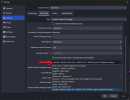
There is no such option for meChange the Container Format from Default Format to something such as matroska and then you should be able pick from a list of Video Encoders including h264_nvenc.
There are too many of themBro, the option is in the screenshot you provided:
View attachment 105159
There are too many of them
rockbottom
Active Member
Get out of the Advanced Custom Output. It is meant for those who know what they are doing & is not supported on the forum. Simple or Standard mode is where you should be operating.
Anyway the answer was already given like a week ago.
+1
Anyway the answer was already given like a week ago.
+1
Change the Container Format from Default Format to something such as matroska and then you should be able pick from a list of Video Encoders including h264_nvenc.
Bro, I put a red box around the option in the screenshot I provided.
Ok, thanks for your help bro, just what should I set this section to?