Hi all,
I discovered the multi-stream plug-in a month or so ago. In my 2nd week of using it I got a 'CPU usage too high' notice.
I was advised that I may need to upgrade my memory from 8GB to 16GB, so luckily my Omen 15 Laptop had another slot, and I did just that.
Last two times I have been able to stream without this message, however the quality in my webcams seem to vary across platforms. On Twitch and X, my webcam quality looks great: https://www.twitch.tv/videos/2195749616
Yet on Youtube my Webscam seems pixilated: https://www.youtube.com/live/3Zr9Pr2CKiM?si=tk3PyUMgKxNo3Cxp
(Please ignore my co-host (SpeedyQ) camera, as his webcam isn't the best)
Can anyone help with this?
My camera input is from Google meets, but that shouldn't be the issue as it isn't on X and Twitch, and wasn't an issue in previous streams before I started Multi-streaming.
My Stats:
16GB
Upload speed: 28.08
3 outputs: X as primary
Twitch
Youtube
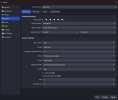
Settings in OBS currently:
CBR
x264
Rescale output disabled
5500 bitrate
Keyframe 2
Profile: High
CPU: Faster
Tune: Zerolatency
Base and Output: 1920 x 1080
I didn't know if moving my Encoder to NVIDIA NVENC H.264 might help or what settings to use if I do? but I was a bit concerned that this may cause my computer to shout at me about CPU usage again, even though I have upgraded to 16GB
Also if anyone has a way of me testing any changes without going live to multiple platforms to make sure it works? That would be fab..
Many thanks,
Nymfria
I discovered the multi-stream plug-in a month or so ago. In my 2nd week of using it I got a 'CPU usage too high' notice.
I was advised that I may need to upgrade my memory from 8GB to 16GB, so luckily my Omen 15 Laptop had another slot, and I did just that.
Last two times I have been able to stream without this message, however the quality in my webcams seem to vary across platforms. On Twitch and X, my webcam quality looks great: https://www.twitch.tv/videos/2195749616
Yet on Youtube my Webscam seems pixilated: https://www.youtube.com/live/3Zr9Pr2CKiM?si=tk3PyUMgKxNo3Cxp
(Please ignore my co-host (SpeedyQ) camera, as his webcam isn't the best)
Can anyone help with this?
My camera input is from Google meets, but that shouldn't be the issue as it isn't on X and Twitch, and wasn't an issue in previous streams before I started Multi-streaming.
My Stats:
16GB
Upload speed: 28.08
3 outputs: X as primary
Twitch
Youtube
Settings in OBS currently:
CBR
x264
Rescale output disabled
5500 bitrate
Keyframe 2
Profile: High
CPU: Faster
Tune: Zerolatency
Base and Output: 1920 x 1080
I didn't know if moving my Encoder to NVIDIA NVENC H.264 might help or what settings to use if I do? but I was a bit concerned that this may cause my computer to shout at me about CPU usage again, even though I have upgraded to 16GB
Also if anyone has a way of me testing any changes without going live to multiple platforms to make sure it works? That would be fab..
Many thanks,
Nymfria