Question / Help Lag InGame (oddly high ms)

NipXe

New Member
I have 1.68 - 1.75mb upload and before I was able to stream 960x540x22fps just fine. Now I always get ping spikes, almost constant of about 120ms. CS:GO is unplayable like that. Before I didn't have such high ping, maybe it went about 40 - 55ms (usually 35ms).

Only thing I have changed is re-installing windows 7 pro 64bit.

I will upload my log.
Butrate 1340kbs. I still lag when reduing it to even 1000kbs.

My ping to London servers is good too, 11 - 15ms.


Edit: I made another Log after Analysing and trying to addmy webcam as a Global Source and also changed from London to Paris.
https://gist.github.com/d5c233dfaf6c16f288b4

Didn't help. In fact more faults in it.

Here are the streams if you want to check the last 2
http://www.twitch.tv/nipxe/profile/past_broadcasts

Minimize Network Impact does not help.
 

Attachments

Last edited:
I have 1.68 - 1.75mb upload and before I was able to stream 960x540x22fps just fine. Now I always get ping spikes, almost constant of about 120ms. CS:GO is unplayable like that. Before I didn't have such high ping, maybe it went about 40 - 55ms (usually 35ms).

Only thing I have changed is re-installing windows 7 pro 64bit.

I will upload my log.
Butrate 1340kbs. I still lag when reduing it to even 1000kbs.

My ping to London servers is good too, 11 - 15ms.


Edit: I made another Log after Analysing and trying to addmy webcam as a Global Source and also changed from London to Paris.
https://gist.github.com/d5c233dfaf6c16f288b4

Didn't help. In fact more faults in it.

Here are the streams if you want to check the last 2
http://www.twitch.tv/nipxe/profile/past_broadcasts

Minimize Network Impact does not help.


Try this:

http://www.teamliquid.net/forum/tech-support/478845-twitchtest-twitch-bandwidth-tester

set the program to your region and allow it to test traffic with the long test on each ingest server. this will give you a baseline of what you can stream with (only use 80% of your tested speed) upload-wise. But, use the ingest with the highest quality. otherwise, between you, your ISP and/or Twitch is having issues with communicating. Lastly, don't saturate your upload connection completely as this is typically why the ping will spike in games while streaming. That and the streaming packet priority being to high (which minimize network impact seems to fix).


Lastly, I would check your physical network connection to your router as the connection is only 100Mbps. this shouldn't be a big deal but having 100Mbps connection on a 1000Mbps network card says there is a weak component on your network somewhere. Either, replug both ends of the CAT5 or at least on links from you to your router are all connected properly. If you are connected to a 10/100 hub in between you and your router, I would see if you can bypass that component to ensure that isn't the issue.
 

Attachments

  • ZERO.JPG
    ZERO.JPG
    52.6 KB · Views: 22
Thank you!

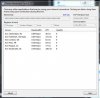
Here's my screenshot. How can I have 0 ZERO quality to every server? What does that mean?

It means one of two things, Your ISP is throttling your upload or your connection to twitch isn't stable enough to achieve the ability to stream fluently

Unfortunately, it doesn't give a graph showing your upload over time so one can't be sure.

Recommended max bitrate to use: 1136 bitrate

for future reference, I took the low average of all the regional ingests (which is 1500) and multiplied by .8 (80%) then subtracted out your audio bitrate. using that with "minimize network impact" should fix your high ping issues.

Recommended Ingest: Amsterdam, NL
 
It means one of two things, Your ISP is throttling your upload or your connection to twitch isn't stable enough to achieve the ability to stream fluently

Unfortunately, it doesn't give a graph showing your upload over time so one can't be sure.

Recommended max bitrate to use: 1136 bitrate

for future reference, I took the low average of all the regional ingests (which is 1500) and multiplied by .8 (80%) then subtracted out your audio bitrate. using that with "minimize network impact" should fix your high ping issues.

Recommended Ingest: Amsterdam, NL


So what should I tell my ISP to make them reduce/stop the throttling (if it is that)?
 
So what should I tell my ISP to make them reduce/stop the throttling (if it is that)?
Tell them you have xxxx Kb/s of upload to them yet you are only getting a max of 1500Kb/s to twitch and ask them if they can assist you or report the issue. have the various ingests ready. I would also attempt hitbox.net as an alternative to twitch if they wont help you past that. Find out what your ISP "says" they are giving you for upload.
 
Back
Top