Hi, i'm currently trying to set up my OBS to begin streaming and produce content creation with my partner, and we are trying to set up some plugins for png animated characters when we talk.
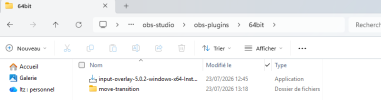
We saw what plugins we needed, we even went to see beforehand how to put them inside the plugin folder, but the current issue is :
It doesnt load up to be used.
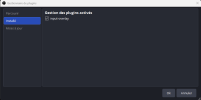
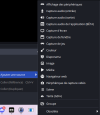
I've aswell installed an "input-overlay" plugin, but from what the video showed, the plugin shouldve been usable in the sources location, but i do not see it, it is tho visible in the "plugin management" page in "Tools", which makes me confused, it IS installed, but it doesnt show up.
We've been also trying to get "move" plugin for the png animation switch for when we'd be talking, but this one simply doesn't show up, regardless the numerous videos we've watched to try finding a solution.
Anyone able to give us a hand here ?
It would mean a lot to finally have a solution, this situation is a long time issue and we're getting lost in settings.
We saw what plugins we needed, we even went to see beforehand how to put them inside the plugin folder, but the current issue is :
It doesnt load up to be used.
I've aswell installed an "input-overlay" plugin, but from what the video showed, the plugin shouldve been usable in the sources location, but i do not see it, it is tho visible in the "plugin management" page in "Tools", which makes me confused, it IS installed, but it doesnt show up.
We've been also trying to get "move" plugin for the png animation switch for when we'd be talking, but this one simply doesn't show up, regardless the numerous videos we've watched to try finding a solution.
Anyone able to give us a hand here ?
It would mean a lot to finally have a solution, this situation is a long time issue and we're getting lost in settings.