Hello there,
Sorry in advance if this already been answered or if this is a really noob question. Kinda new playing with OBS here.
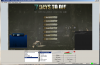
So I created an image in Photoshop to use as the background of my webcam. The image dimension I created is 405x331 but for no reason, when I add this image via Image Source, it add it in my scene with the dimension : 215x177. Is there a downscale option on by default or?
I tried to read about the resolution/aspect ratio but still can't figure out why the image won't keep the original size when I add it to my scene.
You can see some images via the attached files.
Any tip?
Thanks and have a nice day.
Sorry in advance if this already been answered or if this is a really noob question. Kinda new playing with OBS here.
So I created an image in Photoshop to use as the background of my webcam. The image dimension I created is 405x331 but for no reason, when I add this image via Image Source, it add it in my scene with the dimension : 215x177. Is there a downscale option on by default or?
I tried to read about the resolution/aspect ratio but still can't figure out why the image won't keep the original size when I add it to my scene.
You can see some images via the attached files.
Any tip?
Thanks and have a nice day.