Germaximus
Member
Hi,
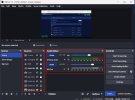
I can't seem to shrink the Audio Mixer window while making the Sources window larger. How can I do that? I want the Audio window to be as big as what my Sources currently is and the Sources to be at least half the size of what the Audio Mixer is. Image attached. Thank you.
I can't seem to shrink the Audio Mixer window while making the Sources window larger. How can I do that? I want the Audio window to be as big as what my Sources currently is and the Sources to be at least half the size of what the Audio Mixer is. Image attached. Thank you.