vagaus
New Member
Hi. I'm trying to configure OBS to use hardware encoding with no success.
Before I continue, I must make it clear that:
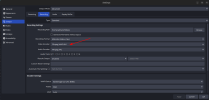
My understanding is that if I had hardware support I'd see VAAPI H.264, VAAPI HEVC, and VAAPI AV1 (or something like that) as encoder options, which I don't see.
Based on the (attached) OBS logs it seems I am missing some configuration as I can see the following message:
but it seems VAAPI is setup on my machine. `vainfo` output:
Any idea on how to investigate / fix this ?
Before I continue, I must make it clear that:
- I am not an experienced Linux user :(
- My knowledge on graphics cards are also not very good :(
My understanding is that if I had hardware support I'd see VAAPI H.264, VAAPI HEVC, and VAAPI AV1 (or something like that) as encoder options, which I don't see.
Based on the (attached) OBS logs it seems I am missing some configuration as I can see the following message:
12:07:11.839: VAAPI: Failed to initialize display in vaapi_device_h264_supported
but it seems VAAPI is setup on my machine. `vainfo` output:
Trying display: wayland
vainfo: VA-API version: 1.22 (libva 2.22.0)
vainfo: Driver version: Intel iHD driver for Intel(R) Gen Graphics - 25.4.2 ()
vainfo: Supported profile and entrypoints
VAProfileNone : VAEntrypointVideoProc
VAProfileMPEG2Simple : VAEntrypointVLD
VAProfileMPEG2Main : VAEntrypointVLD
VAProfileH264Main : VAEntrypointVLD
VAProfileH264Main : VAEntrypointEncSlice
VAProfileH264High : VAEntrypointVLD
VAProfileH264High : VAEntrypointEncSlice
VAProfileJPEGBaseline : VAEntrypointVLD
VAProfileJPEGBaseline : VAEntrypointEncPicture
VAProfileH264ConstrainedBaseline: VAEntrypointVLD
VAProfileH264ConstrainedBaseline: VAEntrypointEncSlice
VAProfileVP8Version0_3 : VAEntrypointVLD
VAProfileHEVCMain : VAEntrypointVLD
VAProfileHEVCMain : VAEntrypointEncSlice
VAProfileHEVCMain10 : VAEntrypointVLD
VAProfileHEVCMain10 : VAEntrypointEncSlice
VAProfileVP9Profile0 : VAEntrypointVLD
VAProfileVP9Profile1 : VAEntrypointVLD
VAProfileVP9Profile2 : VAEntrypointVLD
VAProfileVP9Profile3 : VAEntrypointVLD
VAProfileHEVCMain12 : VAEntrypointVLD
VAProfileHEVCMain422_10 : VAEntrypointVLD
VAProfileHEVCMain422_10 : VAEntrypointEncSlice
VAProfileHEVCMain422_12 : VAEntrypointVLD
VAProfileHEVCMain444 : VAEntrypointVLD
VAProfileHEVCMain444 : VAEntrypointEncSlice
VAProfileHEVCMain444_10 : VAEntrypointVLD
VAProfileHEVCMain444_10 : VAEntrypointEncSlice
VAProfileHEVCMain444_12 : VAEntrypointVLD
VAProfileHEVCSccMain : VAEntrypointVLD
VAProfileHEVCSccMain : VAEntrypointEncSlice
VAProfileHEVCSccMain10 : VAEntrypointVLD
VAProfileHEVCSccMain10 : VAEntrypointEncSlice
VAProfileHEVCSccMain444 : VAEntrypointVLD
VAProfileHEVCSccMain444 : VAEntrypointEncSlice
VAProfileAV1Profile0 : VAEntrypointVLD
VAProfileAV1Profile0 : VAEntrypointEncSlice
VAProfileHEVCSccMain444_10 : VAEntrypointVLD
VAProfileHEVCSccMain444_10 : VAEntrypointEncSlice
Any idea on how to investigate / fix this ?