Hard FPS DROP While streaming/recording LoL

Limon303

New Member
Hi, if someone can please help me solving this, because I have already tried everything (I think). I wanted to start recording my games with OBS while playing with my friends, but I can't because of the FPS drops, making the game unplayable. I can run the game at 200 FPS, but I have it capped at 60 fps.

I tried reinstalling the game and also restarting OBS configuration, but it didn't work either.
The fps drops starts when I try to stream and play the game, it doesn't happen when I play the game withouth streaming.

(btw sorry for my bad english, i'm from Argentina).

I'm putting here things that maybe could help you finding the problem.

imagen_2024-12-10_170641138.png


I also put a Log of OBS there.
 

Attachments

Have you found a fix for this? I'm running into the same exact issue, can't seem to find a thread for this anywhere with a fix.
 
I have this issue as well its something to do with the game capture on the gameplay with league, even while just having obs open not streaming or recording the game capture wont work and makes my game lag out till its unplayable and I close obs, it was fine prior to updating today
 
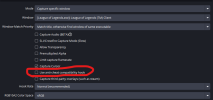
It's looking like this may actually have to do with Riot's anti-cheat Vanguard being the issue here, I can't use game capture, but as long as you don't mind the screen going blank when tabbing out the game as a temporary fix then use window capture with windows 10 capture method.
settings.png
 
It's looking like this may actually have to do with Riot's anti-cheat Vanguard being the issue here, I can't use game capture, but as long as you don't mind the screen going blank when tabbing out the game as a temporary fix then use window capture with windows 10 capture method.
View attachment 109898
Ty bro that helps, and no i don't mind that at all, destop capture makes my game is unplayable. I also noticed it, it has to do something with vanguard, even though there is an option called ''anti cheat hook'' it seems to not work well with it.
 
Hello there. Same problem here! After NVIDIA drivers update, it happens with League Of Legends. Also I think it's an OBS problem, cause I tryed with Streamlabs and had no problem at all. Any help @developers?
 
Hello, got the same problem with the last version released. It works better with a previous versione, i'm currently running the 30.2.3 OBS version
 
I fixed it, my obs have the configuration of "Game Capture" i changed it for "Screen Capture" and my fps was okay after that
 
I believe I found it, try disabling "anti cheat compatibility hook". Fixed it for me.
 

Attachments

  • fix.png
    fix.png
    29.1 KB · Views: 1,002
I fixed it, my obs have the configuration of "Game Capture" i changed it for "Screen Capture" and my fps was okay after that
I moved to screen capture as well, pain in the bum but it's a working situation for now.

I use advanced scene switcher to make it seamless between lobby and game at least.
 
Back
Top