

Jonybadjony
New Member
Hey guys I have an HP laptop with two graphic cards in it:
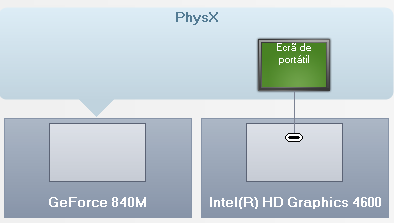
(NVIDIA control panel print screen)
My problem is in OBS only one shows up:

Whenever I try to preview the stream a black screen appears. I've looked up in multiple forums and they say I have to force the graphic card to show up in obs using my NVIDIA control panel.
I'm kind of a newbie to this things. Can anybody help?
Regards,
Jonybadjony
p.s.: Sorry for my bad english
(NVIDIA control panel print screen)
My problem is in OBS only one shows up:
Whenever I try to preview the stream a black screen appears. I've looked up in multiple forums and they say I have to force the graphic card to show up in obs using my NVIDIA control panel.
I'm kind of a newbie to this things. Can anybody help?
Regards,
Jonybadjony
p.s.: Sorry for my bad english
