

ReySheppard
New Member
Hey Guys. So i am new in this Forum here. So first, Hello to all out there =)
So i am streaming for a bit now and i am not a Partner from Twitch atm.
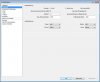
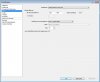
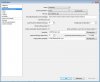
My biggest Problem is the "pixel art" in my Livestreams. I have tested some Settings now and i cant find the best right now. I will post my Settings in some Screenshots. Its in German so be irritated. The stream Picture shows the Quality in middle of the Video. I want to give me Viewerrs some Quality and i am not Proud of the resultes atm. And i Hope you can give me some tipps and trick to get it up to the Max as possible.
My PC Specs:
Intel Core i7-4790K 4x4Ghz
2x Nvidia GeFroce GTX 970
16 Gb Ram DDr3
128GB SSD for the OS (Windows 7 64 Bit)
2x 1,5 TB Harddrives 1 for games 1 for record stuff and Replay buffer from obs
My Internet:
100 Mbts download
6 Mbts upload
My games in this case Project Cars runs in smooth 90-120 FPS in almost Max Settings.
If i stream, im not recording this, just streams Live to twitch. As you can see i use the Nvidia encoder because its not Ripping my CPU off to the ground.
SO Internet ppl do your thing and i have sime Hope that you can help me here.
At least, well i Know my english is Bad but i Hope my Point is getting clear and understandable.
Rey Sheppard
Edit: here is a Link for the Test stream Video from twitch. Dont mind the speaking stuff, its just time Filling stuff for the Streaming Test. :D
Link
So i am streaming for a bit now and i am not a Partner from Twitch atm.
My biggest Problem is the "pixel art" in my Livestreams. I have tested some Settings now and i cant find the best right now. I will post my Settings in some Screenshots. Its in German so be irritated. The stream Picture shows the Quality in middle of the Video. I want to give me Viewerrs some Quality and i am not Proud of the resultes atm. And i Hope you can give me some tipps and trick to get it up to the Max as possible.
My PC Specs:
Intel Core i7-4790K 4x4Ghz
2x Nvidia GeFroce GTX 970
16 Gb Ram DDr3
128GB SSD for the OS (Windows 7 64 Bit)
2x 1,5 TB Harddrives 1 for games 1 for record stuff and Replay buffer from obs
My Internet:
100 Mbts download
6 Mbts upload
My games in this case Project Cars runs in smooth 90-120 FPS in almost Max Settings.
If i stream, im not recording this, just streams Live to twitch. As you can see i use the Nvidia encoder because its not Ripping my CPU off to the ground.
SO Internet ppl do your thing and i have sime Hope that you can help me here.
At least, well i Know my english is Bad but i Hope my Point is getting clear and understandable.
Rey Sheppard
Edit: here is a Link for the Test stream Video from twitch. Dont mind the speaking stuff, its just time Filling stuff for the Streaming Test. :D
Link
Attachments

Last edited:


