Encoding issues with multi-stream setup on RTX5070Ti

Jsmith345

Member
Even if i am aware about a possible driver issue for RTX5000 Series Cards, i need a second meaning.

Is it because of pipeline stalls, only running my GPU at PCIe 5.0x8 ?
  • CPU: Intel Core Ultra 7 265K
  • Mainboard: ASUS ROG Strix Z890-I(TX) Gaming WiFi
  • GPU: ASUS ROG Strix RTX 5070 Ti (Hotfix Driver v581.94)
  • RAM: Corsair Dominator Titanium 48GB Kit DDR5-6000
  • Monitors: 3× ASUS ROG Swift PG27VPQ 1440p@144Hz
  • Storage: 2x Samsung 980 Pro 256GB + 860QVO 2TB (which is where the recording is stored)
  • Windows Game Mode: ON
  • Hardware-accelerated GPU scheduling: ON
  • OS: Windows 11 24H2 Build 26100.6584
  • OBS: 32.0.2 with Aitum Stream Suite 0.4.2
  • Upload: 40 Mbit/s

Like i've mentioned beforce, my PCIe Port is limited to 4.0x16/5.0x8, when 2 M2 SSDs are installed.
I wanted to switch to a bigger 1TB PCIe 5.0x4 SSD to prevent that.

Everyones saying PCIe5.0x16 is completely overkill, even for an RTX5090, but is it still the case with streaming load next to 3D Gaming purposes?
Maybe it's limitiing the bandwidth and i got encoding pipeline stalls.

Or am i pushing the GPU over it's limit, when i want to encode:

Outputs:​

  • Twitch Horizontal: 1080p @ 60fps H.264 7500kbit/s (NVENC)
  • YouTube Horizontal: 2560×1440 @ 60fps AV1 15.000 kbit/s (Intel QSV)
  • YouTube Vertical: 1080×1920 @ 60fps H.264 7500kbit/s (NVENC)

Recording:​

  • Combined Facecam + Gameplay recording canvas: 4480×1440p @ 60fps HEVC CQP25 (NVENC)

In the worst scenario this means 3 streams + one recording. Maybe adding TikTok later, but this would just add bitrate instead of a new encoding process. At the moment, i'm just testing both YouTube Streams without Twitch + the recording.

Whenever i streamed at targeted bitrates, The 1440p stream is lagging and freezing every few seconds for 2-3 seconds (i can add footage later as you wish). TH

If i lower the bitrate from 15k to 8k it's much better, which doesn't make sense. I monitored my upload directly in the router to see how much is used in the whole network. I was at 28 to 36 Mbit/s maximum at peak loads, so there should be enough headroom.

OBS doesnt show any dropped frames via network, cpu or gpu in the stats (but it doesn't include what Aitum does).
Frame render time ~5ms.

The cpu load is always far away from 100% (50 to 70%), not even the igpu cores are fully loaded (also 70%), gpu 3d load ingame (Battlefield 6) is at 95% max, theoretically perfect conditions. I can lower it to ~50% gpu 3d load with multi frame generation on, but its affecting the frame times going up to 14ms.
 

rockbottom

Active Member
Yeah, you want that GPU running @ x16 for best performance. I tested that crap years ago. My 3090 was nerfed about 20% when running x8.

Post a log, probably have some rendering lag/overload.
 

rockbottom

Active Member
Open OBS, run your test for a minute or so, close/re-open OBS & then post the previous log. It will be a complete log, not partial. The Profiler info at the end of the log is useful for spotting where things may be lagging.
 

rockbottom

Active Member
Your mobo is neat, loaded but not enough slots for my liking. I'm running a ROG Z690 Maximus.

For your set-up, I would install a single 990 Pro 2 or 4TB in the M.2-1 slot. That's it, nothing in the other slot.
 
Last edited:

Jsmith345

Member
Log file:

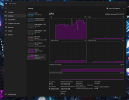
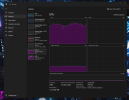
Pictures with load also attached (reference game the finals)


"Your mobo is neat, loaded but not enough slots for my liking. I'm running a ROG Z690 Maximus.
For your set-up, I would install a single 990 Pro 2 or 4TB in the M.2-1 slot. That's it, nothing in the other slot."

I wanted to keep my rog z11 case, because there wasnt any nicer at the market, which also has the window on the right side instead of the left. Installing the graphics card in this case was pain, but temps are pretty stable at 60 degrees maximum gpu temp."

Otherwise i would have bought an atx board.

I planned to buy a 1 tb ssd pcie 5.0, maybe wd black or corsair mp700 pro.
I can still use my sata sdd with 2tb for storage, that shouldnt be a problem in terms of lanes.

Maybe in a few years i will upgrade the ssd to 8tb, also cudimm 96gb if 48gb single rank kits are released. But i am good for the moment with this setup.
 

Attachments

  • 2.png
    2.png
    385.7 KB · Views: 4
  • 1.png
    1.png
    429.2 KB · Views: 4

rockbottom

Active Member
Your issues have issues.

Log is incomplete

Your system is running with the iGPU as Primary GPU.

Nothing is connected to the 5070......

00:42:38.562: [obs-browser]: Blacklisted device detected, disabling browser source hardware acceleration.

00:42:37.874: Initializing D3D11...
00:42:37.874: Available Video Adapters:
00:42:37.882: Adapter 0: Intel(R) Graphics

00:42:37.882: Dedicated VRAM: 134217728 (0.1 GiB)
00:42:37.882: Shared VRAM: 28980634214 (27.0 GiB)
00:42:37.882: PCI ID: 8086:7d67
00:42:37.882: HAGS Status: Disabled (Default: No, Driver status: Unsupported)
00:42:37.883: Driver Version: 32.0.101.7026
00:42:37.884: output 0:
00:42:37.884: name=ROG PG27V
00:42:37.884: pos={0, 0}
00:42:37.884: size={2560, 1440}
00:42:37.884: attached=true
00:42:37.884: refresh=144
00:42:37.884: bits_per_color=8
00:42:37.884: space=RGB_FULL_G22_NONE_P709
00:42:37.884: primaries=[r=(0.639648, 0.330078), g=(0.299805, 0.599609), b=(0.150391, 0.059570), wp=(0.312500, 0.329102)]
00:42:37.884: relative_gamut_area=[709=0.998664, P3=0.736186, 2020=0.528164]
00:42:37.884: sdr_white_nits=80
00:42:37.884: nit_range=[min=0.500000, max=270.000000, max_full_frame=270.000000]
00:42:37.884: dpi=96 (100%)
00:42:37.884: id=\\?\DISPLAY#AUS27B4#5&3032a9f7&0&UID4357#{e6f07b5f-ee97-4a90-b076-33f57bf4eaa7}
00:42:37.884: alt_id=\\.\DISPLAY1
00:42:37.884: output 1:
00:42:37.884: name=ROG PG27V
00:42:37.884: pos={-2560, 0}
00:42:37.884: size={2560, 1440}
00:42:37.884: attached=true
00:42:37.884: refresh=144
00:42:37.884: bits_per_color=8
00:42:37.884: space=RGB_FULL_G22_NONE_P709
00:42:37.884: primaries=[r=(0.639648, 0.330078), g=(0.299805, 0.599609), b=(0.150391, 0.059570), wp=(0.312500, 0.329102)]
00:42:37.884: relative_gamut_area=[709=0.998664, P3=0.736186, 2020=0.528164]
00:42:37.884: sdr_white_nits=80
00:42:37.884: nit_range=[min=0.500000, max=270.000000, max_full_frame=270.000000]
00:42:37.884: dpi=96 (100%)
00:42:37.884: id=\\?\DISPLAY#AUS27B4#5&3032a9f7&0&UID4355#{e6f07b5f-ee97-4a90-b076-33f57bf4eaa7}
00:42:37.884: alt_id=\\.\DISPLAY2
00:42:37.885: output 2:
00:42:37.885: name=ROG PG27V
00:42:37.885: pos={2560, 0}
00:42:37.885: size={2560, 1440}
00:42:37.885: attached=true
00:42:37.885: refresh=144
00:42:37.885: bits_per_color=8
00:42:37.885: space=RGB_FULL_G22_NONE_P709
00:42:37.885: primaries=[r=(0.639648, 0.330078), g=(0.299805, 0.599609), b=(0.150391, 0.059570), wp=(0.312500, 0.329102)]
00:42:37.885: relative_gamut_area=[709=0.998664, P3=0.736186, 2020=0.528164]
00:42:37.885: sdr_white_nits=80
00:42:37.885: nit_range=[min=0.500000, max=270.000000, max_full_frame=270.000000]
00:42:37.885: dpi=96 (100%)
00:42:37.885: id=\\?\DISPLAY#AUS27B4#5&3032a9f7&0&UID4353#{e6f07b5f-ee97-4a90-b076-33f57bf4eaa7}
00:42:37.885: alt_id=\\.\DISPLAY3
00:42:37.886: output 3:
00:42:37.886: name=SAMSUNG
00:42:37.886: pos={5120, 0}
00:42:37.886: size={1920, 1080}
00:42:37.886: attached=true
00:42:37.886: refresh=60
00:42:37.886: bits_per_color=12
00:42:37.886: space=RGB_FULL_G22_NONE_P709
00:42:37.886: primaries=[r=(0.639648, 0.330078), g=(0.299805, 0.599609), b=(0.150391, 0.059570), wp=(0.312500, 0.329102)]
00:42:37.886: relative_gamut_area=[709=0.998664, P3=0.736186, 2020=0.528164]
00:42:37.886: sdr_white_nits=80
00:42:37.886: nit_range=[min=0.500000, max=270.000000, max_full_frame=270.000000]
00:42:37.886: dpi=96 (100%)
00:42:37.886: id=\\?\DISPLAY#SAM0B60#5&3032a9f7&0&UID4352#{e6f07b5f-ee97-4a90-b076-33f57bf4eaa7}
00:42:37.886: alt_id=\\.\DISPLAY4
00:42:37.886: Adapter 1: NVIDIA GeForce RTX 5070 Ti
00:42:37.886: Dedicated VRAM: 16679698432 (15.5 GiB)
00:42:37.886: Shared VRAM: 28980634214 (27.0 GiB)
00:42:37.886: PCI ID: 10de:2c05
00:42:37.886: HAGS Status: Enabled (Default: No, Driver status: Supported)
00:42:37.886: Driver Version: 32.0.15.8194
 

Jsmith345

Member
It doesn’t really surprise me that the OBS log isn’t fully showing the problem. Most of the critical workflow happens inside the Aitum Suite plugin, so I assume OBS is not able to log all encoder operations properly, especially because almost all encoding tasks go through Aitum instead of OBS’ native pipelines.

However, you mentioned something very interesting which I investigated further last night: OBS is running with the iGPU as the primary rendering device. That was intentional. The idea behind that setup was to offload scene rendering, browser sources, transitions and overlays from the dGPU, so the RTX GPU would have more headroom for 3D rendering and wouldn’t have to sacrifice resources when the encoder is under pressure. That’s the theory. In practice it turned out differently.

It seems that this setup actually causes additional data transfers between iGPU and dGPU, which creates more overhead than running everything purely on the dGPU.

Resource usage measurements:

  • Scenes/overlays on iGPU: ~15–25% GPU load
  • Scenes/overlays on dGPU: ~3–5% 3D load
So at first I thought the additional 5% 3D usage on the dGPU would cause encoder overload or starvation, but it seems that is not the case.

Because no matter how I distributed the encoding workload:

  • 1/3 on iGPU and 2/3 on dGPU
  • 2/3 on iGPU and 1/3 on dGPU
  • iGPU only
  • dGPU only
→ The results were always the same.

At around 15,000 kbps on the AV1 stream the video begins to stutter. But when I reduce the bitrate to around 8,000 kbps everything suddenly runs perfectly fine, even when encoding entirely on the RTX GPU. So this does not look like traditional encoder overload. As far as I know, changing the bitrate should not really increase encoder workload significantly. Or am I wrong on that?

At this point I suspect a possible networking bottleneck. But I don’t understand why this would still occur even with enough upload bandwidth available and several Mbps of headroom left. (I tested my connection and I can push around 40 Mbps reliably.)

It currently works fine for two streams + recording when I lower the total bitrate, but if I add Twitch into the mix again, that additional bitrate will be added on top of everything and I expect the same problem to reappear.
 

rockbottom

Active Member
Nonsense, your rig is mis-configured/nerfed.

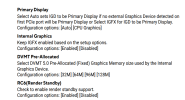
Download your BIOS manual from your mobo's support page & set your 5070 as Primary GPU.
 

Jsmith345

Member
Nonsense, your rig is mis-configured/nerfed.
So, whats your guess on it?

"Download your BIOS manual from your mobo supoort page & set your 5070 as Primary GPU."
Its on auto at the moment, but i changed OBS running with RTX on High Performance already yesterday via the windows graphics menu.

Do you think i should completely disable the igpu again?
 

Jsmith345

Member
i know where to find it, but what exactly do i have to expect if i set primary gpu to pcie in bios?

I know my bios options pretty well and if i remember correctly - without going in - i can just set auto or igpu, not discrete gpu exclusively.

Edit: Like already mentioned above, theres no option to put the discrete gpu exclusively to primary, its done via auto setting.

REBAR is on since i got the system 2 months ago.
 

Attachments

  • gpu.png
    gpu.png
    113.1 KB · Views: 4
Last edited:

rockbottom

Active Member
The 5070 can do far more work.

Your OBS set-up still needs attention, lots of room for improvement, if & when the system is configured correctly.
 
Top