
Question / Help Elgato not working after last Update?

NightShade

New Member
Hi everyone,

just wanted to start streaming some Destiny and saw there is a Update for OBS. Naturally, i downloaded it.
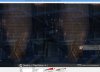
Well, now streaming from my Elgato Capture Card doesnt seem to work anymore via OBS. Everything worked like a charm in the last Update. Any Work Around or Ideas?

This is what it looks like.
 

Attachments

  • ss+(2014-09-16+at+05.20.54).jpg
    ss+(2014-09-16+at+05.20.54).jpg
    400.5 KB · Views: 35
Open your Elgato's video capture source properties in OBS and try setting a custom resolution that matches what your console is outputting. Does that fix the issue? The last update added support for Elgato resolution switching so you're no longer locked in to 720p, which may mean that the resolution needs to be set manually.
 
Doesnt seem to work. However if i set the resolution to 720p in the Elgato Settings Panel i get a picture. As soon as i go up to 1080p (which worked until now) it gives me kinda like a double image. Like it trys to do stereo 3d (2 pictures side by side )
 
OBS never supported 1080p output from the Elgato, it's only the last update that added support for that. Is your console set to output at 1080p or 720p?
 
It just crashes when it loads and the whole software just crashes down. Its nothing to do with the elgato as am streaming from their software right now.
 
If Elgato's own software is crashing then we can't really help with that, sorry. You should contact Elgato support.
 
The Elgato's software is working fine am trying to say i can livestream on the elgato's livestream software fine but when i use the elgato on your software. OBS Crashes.
 
If you believe that the update caused problems. I'd suggest downloading the version that you had when it was correctly functioning at least as a temporary solution.
 
Ah sorry, misunderstood your post @j10adn. Try removing the Elgato source from your scene entirely (delete it as a global source if you have it as one), then re-add it and manually set the resolution to match whatever it's receiving. Make sure Elgato's own software is not running at all. If all else fails, try rebooting.
 
I tried everything you've pretty much said i could do. Like i said everything worked fine until i updated OBS's software.
 
Back
Top