Dom_Om_Nom
New Member
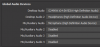
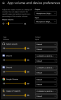
So long story short, I en route all my games and discord audios to the built-in NVIDIA high definition audio in my normal sound settings (which is an imaginary route that doesn't actually play any sound).
In my obs audio settings, I en route discord to the desktop audio (which I have muted all the times so the viewer's perspective doesn't hear it), games as desktop audio 2, and auxiliary as my mic.
I thought everything is set up and worked great so far. The first problem I came across is that I start to notice that all the audio that I en route do not make any sound until obs is open - my solution for that was to open it and minimize it in the system tray every time (worked for couple weeks).
Then suddenly, today all my game audio and discord stop working despite obs is running. They will only turn on if I en route the audios that I need to be playing in the sound setting by toggling it back to default input and output.
Here's my last log: https://obsproject.com/logs/e2ZooAqXmPloxad
In my obs audio settings, I en route discord to the desktop audio (which I have muted all the times so the viewer's perspective doesn't hear it), games as desktop audio 2, and auxiliary as my mic.
I thought everything is set up and worked great so far. The first problem I came across is that I start to notice that all the audio that I en route do not make any sound until obs is open - my solution for that was to open it and minimize it in the system tray every time (worked for couple weeks).
Then suddenly, today all my game audio and discord stop working despite obs is running. They will only turn on if I en route the audios that I need to be playing in the sound setting by toggling it back to default input and output.
Here's my last log: https://obsproject.com/logs/e2ZooAqXmPloxad