Configured recording path could not be opened

Clipperton

New Member
Hello
I took a month off from transferring my 8mm tapes to the computer. When I returned, and clicked Record, a sign popped up that said, the configured recording path could not be opened. Please check your recording path under setting, output, recording.
I don't know what to do when I get to the output section.
Can anyone help me? thank you
 
You have to stop your current outputs (stream, recording, NDI, virtual cam, etc.) to make changes to some settings.
 
Hello
I took a month off from transferring my 8mm tapes to the computer. When I returned, and clicked Record, a sign popped up that said, the configured recording path could not be opened. Please check your recording path under setting, output, recording.
I don't know what to do when I get to the output section.
Can anyone help me? thank you
so where is the answer for the above as mine says "The configured Recording Path could not be opened. Pls check Recording Path under setting-Output-recording." What should be checked under output ?
 
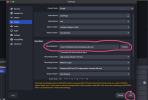
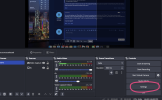
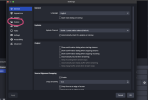
You must click settings under "Studio Mode." It'll bring you to a pop-up and you should then click "Output." You will see a sub-option called "Recording." Then the first option should ask you what your recording path is. This just means where on your computer do you want these files to be located. My folder in my files is called "Yt.vids" so I made that my option, then it let me record.

I hope this helped!!!!
(attached some screenshots of what I clicked to resolve the issue)
 

Attachments

  • Screenshot 2024-08-19 at 9.08.16 PM.png
    Screenshot 2024-08-19 at 9.08.16 PM.png
    756.2 KB · Views: 506
  • Screenshot 2024-08-19 at 9.08.27 PM.png
    Screenshot 2024-08-19 at 9.08.27 PM.png
    519 KB · Views: 535
  • Screenshot 2024-08-19 at 9.08.42 PM.png
    Screenshot 2024-08-19 at 9.08.42 PM.png
    563.2 KB · Views: 498
Hello,
I have been following this thread (and others on this topic) since Ihave the same problem:
I cannot change the path as shown in the 3rd screen shot. This function is not active.
I understand that all input need to be stopped to activate this option.
However, I turned off / stopped all potential input software (NDI and others).
The sound feed comes via a sound switch box, and even that was off.
So no idea what is blocking it.
Re-activating this thread now, in hope someone has any idea why else the output path cannot be changed.
The goal is to divert it to a removable drive, not the internal/default HDD.
 
Back
Top