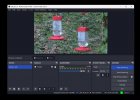
Can I stream 3 AXIS IP Cameras to 3 Live Streams on YouTube at the same time.

Plus I really put a lot of compression on my streams from the camera and worked with those links to use the profiles differently so I really fine-tuned all that and I think that helped.

Hey do you have any experience with the browser feed. I can't get it to refresh my weather?
 
maybe after I installed OS I didn't reboot I don't think.
That *might* be it. I've been surprised before, with what requires a reboot.

Hey do you have any experience with the browser feed. I can't get it to refresh my weather?
I use one to get a live stream from the IP Webcam phone app, with hardly any latency (but it probably can't survive the open internet), but that's about it.
Get the URL right, and it "just works"...except I have to manually refresh it if I don't have the phone app running already when OBS starts.
 
That *might* be it. I've been surprised before, with what requires a reboot.


I use one to get a live stream from the IP Webcam phone app, with hardly any latency (but it probably can't survive the open internet), but that's about it.
Get the URL right, and it "just works"...except I have to manually refresh it if I don't have the phone app running already when OBS starts.
the html file is here local. Weather stations on the roof.
 
I just redid that app there and the bottom right so the weather fits there better everything looks good to me but I keep getting reminded 90% of the people are watching this on a phone
 
I didn't switch this stream over to HLS yet. Gonna see how it goes for a little while before I go down that road. But the other two streams are on HLS H.265 now.
 
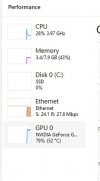
the GPU is working quite hard.
 

Attachments

  • GPU.jpg
    GPU.jpg
    18.5 KB · Views: 10
Too bad there's no working install instructions for that browser refresh. I read it 15 times there's no instructions there for Windows.

It says that unzip the contents of the folder into the root directory of obs that's not how you install it.

 
the GPU is working quite hard.
For a constant load, that's perfectly fine, so long as your cooling holds up.

Too bad there's no working install instructions for that browser refresh. I read it 15 times there's no instructions there for Windows.

It says that unzip the contents of the folder into the root directory of obs that's not how you install it.

The Linux instructions have filepaths that look familiar, from a plugin that I started using before it had a for-real installer and so it had a similar set of instructions that worked. Windows has a similar concept, but its directory names are completely different, and the structure is slightly different too. But maybe you can still take some clues from it.
 
For a constant load, that's perfectly fine, so long as your cooling holds up.


The Linux instructions have filepaths that look familiar, from a plugin that I started using before it had a for-real installer and so it had a similar set of instructions that worked. Windows has a similar concept, but its directory names are completely different, and the structure is slightly different too. But maybe you can still take some clues from it.
Yeah I've been at it an hour I tried every scenario I could think of. And even looking at past instructions they're saying copy the DLL here and there is no DLL file that's from my previous version. There's absolutely no working instructions for Windows.
 
Good morning AaronD,

So everything has been going good and I was building confidence in the OBS server and then this morning a stream was down. no Crash log. when I restarted the stream it started but was sending no data. light was green in the conner and 0 going out. see picture. I rebooted and then it worked.

her is the only thing showing in event viewer.
 

Attachments

  • Screenshot 2023-08-19 064552.jpg
    Screenshot 2023-08-19 064552.jpg
    162.6 KB · Views: 6
  • error.txt
    error.txt
    2.4 KB · Views: 5
Do you know if there is any kind of watch dog I can put on the streams to email me if there is an issue. This went down at 5:30 last night and I didn't know about it till this morning.
 
these are the only issues I see looking at the current OBS logs.

06:49:04.603: No AJA devices found, skipping loading AJA UI plugin
06:49:04.603: Failed to initialize module 'aja-output-ui.dll'
06:49:04.604: No AJA devices found, skipping loading AJA plugin
06:49:04.604: Failed to initialize module 'aja.dll'
06:49:04.604: Skipping module '../../obs-plugins/64bit/chrome_elf.dll', not an OBS plugin
06:49:04.605: [CoreAudio encoder]: CoreAudio AAC encoder not installed on the system or couldn't be loaded
06:49:04.606: Failed to load 'en-US' text for module: 'decklink-captions.dll'
06:49:04.606: Failed to load 'en-US' text for module: 'decklink-output-ui.dll'
06:49:04.609: A DeckLink iterator could not be created. The DeckLink drivers may not be installed
06:49:04.609: Failed to initialize module 'decklink.dll'
06:49:04.624: [AMF] Unable to load 'amfrt64.dll', error code 126.
06:49:04.625: [AMF] AMF Test failed due to one or more errors.
06:49:04.625: Failed to initialize module 'enc-amf.dll'
06:49:04.633: Skipping module '../../obs-plugins/64bit/libcef.dll', not an OBS plugin
06:49:04.633: Skipping module '../../obs-plugins/64bit/libEGL.dll', not an OBS plugin
06:49:04.633: Skipping module '../../obs-plugins/64bit/libGLESv2.dll', not an OBS plugin
 
Do you know if there is any kind of watch dog I can put on the streams to email me if there is an issue. This went down at 5:30 last night and I didn't know about it till this morning.
My first thought is this:
1692456189345.png

 
Back
Top