Hi,
I've spent the last 2 weeks (and a lot of money) building a gaming recording/streaming setup. I am very close to having it complete, but am running into an issue.
I'm using an Elgato HD60 X to run my PS5 Pro into OBS.
When I used my Google Pixel 10 Pro XL as a camera, everything works.
I then purchased a Sony Z-EV10 camera.
When I connected this camera to my computer via USB C to USB A, it worked, but the quality was only 720, which of course I bought this camera so I could have higher quality than that.
Gemini told me in order to actually get higher video quality into OBS from the camera, I needed a micro HDMI to HDMI cable, and a mini capture card to connect it to.
I bought both, here is the mini capture card I bought and am using:
UGREEN 2K@30Hz 1080P 60FPS Video Capture Card 4K Input HDMI to USB 3.0 A and USB C Capture, Low Latency Capture Card for Streaming Game Recording Compatible with Switch 2/Xbox/PS4/PS5/PC/Camera
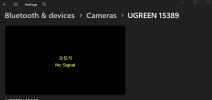
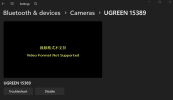
Ever since I connected the camera to my computer using the new micro hdmi to hdmi cord into the new UGREEN dongle, I cannot get any video signal in OBS.
I can't even get any video signal in windows.
I've tried changing settings, I've tried both the USB A and USB C on the dongle, nothing.
The computer recognizes the device though, just no signal.
I attached some pictures so you can see.
Any help would be appreciated as I cannot seem to figure this out.
Thanks in advance!
I've spent the last 2 weeks (and a lot of money) building a gaming recording/streaming setup. I am very close to having it complete, but am running into an issue.
I'm using an Elgato HD60 X to run my PS5 Pro into OBS.
When I used my Google Pixel 10 Pro XL as a camera, everything works.
I then purchased a Sony Z-EV10 camera.
When I connected this camera to my computer via USB C to USB A, it worked, but the quality was only 720, which of course I bought this camera so I could have higher quality than that.
Gemini told me in order to actually get higher video quality into OBS from the camera, I needed a micro HDMI to HDMI cable, and a mini capture card to connect it to.
I bought both, here is the mini capture card I bought and am using:
UGREEN 2K@30Hz 1080P 60FPS Video Capture Card 4K Input HDMI to USB 3.0 A and USB C Capture, Low Latency Capture Card for Streaming Game Recording Compatible with Switch 2/Xbox/PS4/PS5/PC/Camera
Ever since I connected the camera to my computer using the new micro hdmi to hdmi cord into the new UGREEN dongle, I cannot get any video signal in OBS.
I can't even get any video signal in windows.
I've tried changing settings, I've tried both the USB A and USB C on the dongle, nothing.
The computer recognizes the device though, just no signal.
I attached some pictures so you can see.
Any help would be appreciated as I cannot seem to figure this out.
Thanks in advance!