Question / Help Blackmagic intensity pro having NTSC issues (solved)

make sure to uncheck costom resolution in OBS when using blackmagic intensity pro that worked for me
 

Attachments

  • 0PImI7i.png
    0PImI7i.png
    210.2 KB · Views: 47
Last edited:
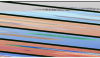
so i am trying to get my blackmagic intensity pro to work with ntsc resolutions and i have already set everything to the right formats and outputs and inputs in the blackmagic control panel and anytime i try to output ntsc in obs the screen gets scrambled i have included a picture of what is happening in the obs video window i am using the breakout cable and as you can see im trying to get my dreamcast to work right and so far i have been able to get the capture device to display right in pal resolutions but the tv is grey screened the screen scrambling you see in the picture happens when i try to make it work in 720x480 as opposed to 720x486 again it's already set to NTSC 480i in the blackmagic control panel

since I know nearly nothing about these cap cards, here is a link to a post with similar words :D

https://obsproject.com/forum/thread...-works-in-bm-media-express.24563/#post-123028

No, I recall this guy getting a black screen but I think he fixed whatever he was doing. I just posted it because I think you'll at least maybe have some POCs to talk with
 
since I know nearly nothing about these cap cards, here is a link to a post with similar words :D

https://obsproject.com/forum/thread...-works-in-bm-media-express.24563/#post-123028
No, I recall this guy getting a black screen but I think he fixed whatever he was doing. I just posted it because I think you'll at least maybe have some POCs to talk with

yep i got it seems to be an issue with setting the costom resolution i unchecked it and it works fine now so i have marked it as solved and also do not select blackmagic WDM use decklink video capture otherwise the picture will freeze
 
yep i got it seems to be an issue with setting the costom resolution i unchecked it and it works fine now so i have marked it as solved and also do not select blackmagic WDM use decklink video capture otherwise the picture will freeze
Good to note. I will remember that in case we get other people with similar issue
 
Back
Top