Question / Help black bars around video streamed from TV

permutations

New Member
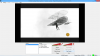
I'm using a video capture card to record video from my TV/DVR. The input is 720x480, 30fps (NTSC). I realize I'm never going to get HD out of that, but I'd like the picture to fill the screen, and no matter what settings I try, there is a black border around the video. In the attached screenshot, I have set it to fill the screen. The problem is that the borders are WITHIN what OBS considers the full screen. Is there any way to get this to work correctly? I've searched the site, and it seems that virtually everyone using this software is using it to capture game play, not NTSC video.

Thanks in advance for any help.
 

Attachments

  • OBS-VideoBorder.png
    OBS-VideoBorder.png
    388.5 KB · Views: 29
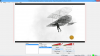
That was a great idea, thanks! It's not quite perfect because the input display ratio is slightly different from the output ratio, but it's much better. Now I have no bars on the sides, and very thin bars on the top and bottom.

When I output video from my computer to my TV, the top and bottom is slightly cut off, so this should be perfect. Thanks!!

What are "scenes", by the way? I don't really understand the concept.
 

Attachments

  • OBS-VideoSceneEdit.png
    OBS-VideoSceneEdit.png
    467 KB · Views: 32
Thats nice to hear!

To explain it with an example, u can change scences by clicking on them while u streaming, so you could change from desktop to ingame, when playing League of Legends. Or from any activity to an AFK Screen with that info on it, so new people know.

regards, Felix
 
Hmm... I'm still confused by this, probably because I'm not a gamer. The first time I played a game, I got so addicted to it that I decided it was better to stay away. LOL
 
Back
Top