Advanced Masks

Advanced Masks 1.6.0

Hello, I am a new user to OBS and installed the plug-in, but when I added the filter to my camera it does not show the camera. When I toggle off the Advanced Mask filter the camera reappears. Any suggestions? I am using OBS 32.0.1
 
Hello, I am a new user to OBS and installed the plug-in, but when I added the filter to my camera it does not show the camera. When I toggle off the Advanced Mask filter the camera reappears. Any suggestions? I am using OBS 32.0.1
Hi Bradley,

There are typically two causes for this:

1. you are on MacOS and are using the new Experimental Metal renderer, which the plugin is not compatible with. or
2. The install did not work properly, and you're missing the data files required for the plugin.

If you can get me a log file, I can help figure out what is going on. To do so, run OBS, toggle on/off the filter (to log any issues it might have when being enabled), then go to `Help --> Log Files --> Upload Current Log File`. Next copy the URL it gives you and either past it here, or DM it to me, and I will take a look.

 
Hi Bradley,

There are typically two causes for this:

1. you are on MacOS and are using the new Experimental Metal renderer, which the plugin is not compatible with. or
2. The install did not work properly, and you're missing the data files required for the plugin.

If you can get me a log file, I can help figure out what is going on. To do so, run OBS, toggle on/off the filter (to log any issues it might have when being enabled), then go to `Help --> Log Files --> Upload Current Log File`. Next copy the URL it gives you and either past it here, or DM it to me, and I will take a look.
I am running OBS on windows and I downloaded OBS-advanced-masks-1.5.4-windows.zip
 
From the logs, it looks like the data folder was not properly installed. To install from the zip file, open the zip, and drag *both* the `data` and `obs-plugins` folders to your root OBS install directory. Since you have already installed the plugin .dll file, it will probably warn you that 2 files will be overwritten. This is fine as it is just the plugin files.
 
So I have an interesting bug
(skimmed these 7 pages and didnt see it)
So installed 1.5.4 Win Installer on OBS 31.01

I have a scene (View-Visuals) that contained a scene clone (SC-Front) which is a camera.
I applied the Ad Mask to that. It worked fine. I then removed it. Goes away. Then I switch to View-Front scene (same camera). And the mask is there. Even though I never applied it to it (or camera directly)
Check camera scene and its not there.
Not there in any of the scenes that uses that camera, not even the View-Visuals that I had applied it to BUT cant get it off the View-Front scene.
Put it back On SC-Front but that didn't effect anything.
I used Plugin Manager to turn off Advanced Mask and that removes it but comes back if I turn it back on.
I turned off. Uninstalled (x2 via Windows & App). Note that in Plug In Manager the check box and text are still there greyed out with MISSING.
Reinstalled. Turned ON. Mask is back.

LOG
 
I've not seen this behavior myself (and run quite a few sources with both Advanced Masks and Shaderfilter). If you post a log, I might be able to see if there is something funny going on. Additionally, both Advanced Masks and Shaderfilter offload all of their processing to the GPU, so I'm not sure why you'd be seeing any significant CPU use from either.
 
Howdy! I'm having an issue with this plugin on Linux. I'm using the Flatpak version of OBS, but I can install plugins manually by heading into the settings folder, making a plugins folder there and putting the plugin there. Works fine from what I've seen so far, and does the trick for me for Downstream Keyer.

But this plugin won't load for me. Any idea what I can do to fix it? I'm getting the following error in the log:

Code:
13:54:54.294: os_dlopen(/home/joshmono/.var/app/com.obsproject.Studio/config/obs-studio/plugins/obs-advanced-masks/bin/64bit/obs-advanced-masks.so->/home/joshmono/.var/app/com.obsproject.Studio/config/obs-studio/plugins/obs-advanced-masks/bin/64bit/obs-advanced-masks.so): libobs-frontend-api.so.0: cannot open shared object file: No such file or directory
13:54:54.294:
13:54:54.294: Module '/home/joshmono/.var/app/com.obsproject.Studio/config/obs-studio/plugins/obs-advanced-masks/bin/64bit/obs-advanced-masks.so' not loaded
 
Hey so im on OBS 32.0 and got installed Advanced Masks 1.5.4 - the issues is still there for me where i have to check and uncheck Scene view Transformation for it to snap back.
 
Hello! Maybe I am stupid, but, I am trying to invert the mask and it does not look like it wants to invert. Ticking the box does nothing. Tried it on the original shape as well, to no avail.

I'm on 32.0.4
 

Attachments

  • 1770751507793.png
    1770751507793.png
    19.7 KB · Views: 159
Hello, I recently downloaded this plugin and I'm not experiencing the same thing as what is shown...
it complete masks over everything and the text is shown in the picture I have. I did put it in plug-ins but this is weird... any help would be great
 

Attachments

  • umm.png
    umm.png
    20.4 KB · Views: 94
So no response on the weird HEART issue? (see post - 5 above for more details.)

Short - I have AIM on a source clone of my main camera in a particular scene.
It works as should BUT if I view just my Main camera (diff scene) - it shows the heart shape on it - without the filter being applied to it. And I cant get rid of it.
 
I just solved my issue.
I built a new scene. Exact as other. Works fine so deleted OG and renamed new one back to OG name. But why it happened in first place.

Synopsis of issue.
Main cam - no scenes. I Source Clone cams for all scenes. 2 scenes. View-Front and View-Front-Visuals. Both have an individual SC of CAM 1. I used AIM on View-Front-Visuals. It works as should but then View-Front CAM 1 SC had a HEART image mask with no filter applied. I couldn't get rid of it.
 
FiniteSingularity updated Advanced Masks with a new update entry:

Release 1.6.0

This release bring OBS 33 compatibility to the Advanced Masks plugin.

Note: For this release, Windows and Linux files denoted by "legacy" in their filename are intended for OBS versions 30-32, whereas files without "legacy" use the new format for OBS 33. MacOS uses the same format throughout, so there is no legacy version.

Read the rest of this update entry...
 
Thanks for the update!

I'm setting this up for OBS Studio 33 (portable) and downloaded obs-advanced-masks-1.6.0-windows-x64.zip. I noticed that the files (obs-advanced-masks.dll, .pdb, and the data/ folder) are placed directly in the root of the archive without an enclosing plugin folder.

With Retro Effects 1.1.0, everything was wrapped inside its own plugin folder, which made it clear how to drop it into the new OBS 33 plugin structure.

Should I manually create an obs-advanced-masks/ folder and place these files inside it before dropping it into the OBS plugin directory, or is there another intended installation path?

Thanks!
 
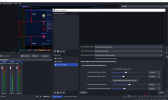
Hello sir, I've been trying to use advanced mask 1.6.0 and whenever I add the filter to my source it just disappears. I've tried using the installer but then the plugin never showed up in OBS, I manually downloaded the zip version and copied the dll and pdb files in "C:\Program files\obs-studio\obs-plugins\64bit" along with other plugin files I see in the directory and I could see the plugin show in obs. I've also copied the sub folders inside "data" (locale/shaders/manifest.json) into the "C:\Program files\obs-studio\data\obs-plugins\".. but I still do not see my source getting masked as expected. I've also tried copying the data folder to other locations but no luck so far. Please help
 

Attachments

  • ADVANCED MASK.PNG
    ADVANCED MASK.PNG
    233.1 KB · Views: 2
Back
Top