A strange issue when using Virtual Camera to share OBS in Discord

Anne_Bounchoy

New Member
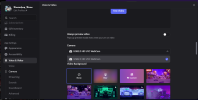
So, i set up everything in obs- im turning on the Virtual camera on discord (i did intall the virtual camera from the plugins). i try to find the virtual camera in the discord camera drop down, but it isnt there. searched through the internet for the wholeday, but i simlpy cant find a solution. Help?
 

Attachments

  • Screenshot 2026-04-10 233608.png
    Screenshot 2026-04-10 233608.png
    260.3 KB · Views: 18
Do you have the virtual camera turned on...? Like.... from the Controls dock, middle one, between "Start Recording" and "studio Mode"...?


Also, doesn't OBS come with Virtual Camera now? So which one are you downloading as a plugin?
I use the Droid Cam Virtual Output plugin, because it was the only one that showed sources from the Exeldro Downstream Keyer plugin. The native one - and others - didn't register anything shown on DSK, so it was my only option. I haven't looked into whether or not that has been fixed, but I've stuck with it.

If you have a plugin like that, you might have to turn it on in another place as well. That one requires going into your Tools options up top, and making it "Active" - not sure if your plugin, if different, requires a similar thing (That one has options for "Active" and "Autostart when OBS is active")

 
okay so uh... first of all, yeah, i do have the virtual camera turned on when i try! abouthte obs camera- i saw lots of people tell to download the virtual camera from the path that goes smth like obs - 64 - bin - plugins (i dont really remember, im sorry..). and i never touched any other plugins that you listed- im like 3 days in OBS
 
Back
Top