V1.3
- Reverted to the v1.0 codebase as the stable release foundation
- Removed optional session folders for copied replays
- Removed stream-name and session-based replay organization
- Removed tag-based replay saving and related hotkeys
- Removed v1.2 file scanning and numbering logic
- Returned the script to the simpler and more reliable v1.0 replay workflow
- Removed replay history cap
- Replay history is no longer limited by an internal maximum
- Replays remain available for the full OBS session unless manually cleared
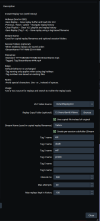
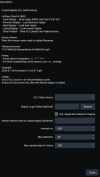
- Removed the Max Replays Kept in Historysetting
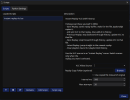
- Simplified the script UI
- Returned replay retention control to the end user
- Preserved core replay behavior
- Instant Replay support using OBS Replay Buffer and a VLC source
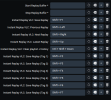
- Replay history with navigation hotkeys
- Single-file VLC playlist behavior for direct replay loading
Why this rollback happened
v1.2 introduced additional replay management features, but those additions also increased complexity in the script and moved it away from the core behavior that mattered most. The v1.0 foundation proved to be the more reliable base for actual live-session use, especially for keeping replay handling simple, predictable, and easy to manage.
This rollback was done to restore stability, reduce unnecessary moving parts, and keep the script focused on its primary job: saving replays, loading them cleanly into VLC, and allowing straightforward session-based replay navigation without artificial limits.