


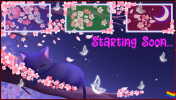
Trivia: I saw an old animation using CSS to create an animated pride flag, and thought to myself it was time to create a webgl version: smoother and lightweight and that could be added as a prop to any stream.
The available flags as of now:
0 Rainbow Pride
1 Philadelphia Pride
2 Progress Pride
3 Transgender
4 Bisexual
5 Lesbian
6 Gay Men
7 Pansexual
8 Asexual
9 Non-binary
10 Genderfluid
11 Intersex
12 Aromantic
13 Demisexual
14 Agender
15 Genderqueer
16 Polysexual
17 Lipstick Lesbian
18 Bear Brotherhood
19 Two-Spirit
How to set it up for dynamic control:
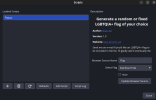
1) Add the python script to your Tools -> Scripts menu on Obs
2) Configure python if needed (I believe all libraries are included on the newest python versions, so you probably to install any module, but, please, tell me otherwise).
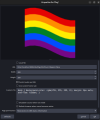
3) You need to add a browser source to your OBS, name it whatever you like and add it to the textfield Browser source name. Then go to localhost:9000 and look where is the file flag.html, and add it as an URL.
How to set it up offline:
0) Delete flag.py
1) Create an OBS source, and set the URL to where you extracted the zip file, something like
file:///<path within your computer>/obs/flag.html
This will work, but you won't have dynamic control, which means, it will show a random LGBTQIA+ flag by default. If you want to set a fixed specific flag, you will need to change the lines 347 and 348 from the file flag.html (this is for version 1.0, check updates for newer versions):
const auto = getParameterByName('auto') === 'true' || 'true';
var idxFlag = Number(getParameterByName('num') || '0');
change them to
const auto = false; // true or false; change flags or not
var idxFlag = 0; // choose a number between 0 and 19
The available flags as of now:
0 Rainbow Pride
1 Philadelphia Pride
2 Progress Pride
3 Transgender
4 Bisexual
5 Lesbian
6 Gay Men
7 Pansexual
8 Asexual
9 Non-binary
10 Genderfluid
11 Intersex
12 Aromantic
13 Demisexual
14 Agender
15 Genderqueer
16 Polysexual
17 Lipstick Lesbian
18 Bear Brotherhood
19 Two-Spirit
How to set it up for dynamic control:
1) Add the python script to your Tools -> Scripts menu on Obs
2) Configure python if needed (I believe all libraries are included on the newest python versions, so you probably to install any module, but, please, tell me otherwise).
3) You need to add a browser source to your OBS, name it whatever you like and add it to the textfield Browser source name. Then go to localhost:9000 and look where is the file flag.html, and add it as an URL.
How to set it up offline:
0) Delete flag.py
1) Create an OBS source, and set the URL to where you extracted the zip file, something like
file:///<path within your computer>/obs/flag.html
This will work, but you won't have dynamic control, which means, it will show a random LGBTQIA+ flag by default. If you want to set a fixed specific flag, you will need to change the lines 347 and 348 from the file flag.html (this is for version 1.0, check updates for newer versions):
const auto = getParameterByName('auto') === 'true' || 'true';
var idxFlag = Number(getParameterByName('num') || '0');
change them to
const auto = false; // true or false; change flags or not
var idxFlag = 0; // choose a number between 0 and 19
-
 Screenshot from 2026-02-17 01-45-28.png
 -
 Screenshot from 2026-02-17 01-32-05.png
 -
 Screenshot from 2026-02-17 01-31-35.png
