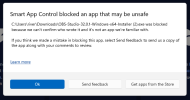
I am a new user. I searched for this and didn't see a thread so forgive me if this is addressed somewhere else. I am trying to install OBS but Windows Smart App controller keeps blocking it. Should I just turn it off, or is there a better work around to install it?
OBS is properly digitally signed, so it should be allowed by that security function. Make sure you got the original OBS installation from the official download location: https://obsproject.com/download
I don't know how this Windows smart app controller works in depth, I thought it is satisfied if the installer is digitally signed.
What happens if you open the properties of the installer, change to the digital signatures tab and show the details of the signature? It should say the signature is valid and it should show OBS Project, LLC as name, and the signature date should be as this:
If this is the case for your installer, I don't know much more. I thought if there was a general issue with the OBS installer, there would be more reports on the forum about this, but there are none except yours as far as I see.
This site uses cookies to help personalise content, tailor your experience and to keep you logged in if you register.
By continuing to use this site, you are consenting to our use of cookies.