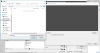
Question / Help When adding an image to a scene with Browse, OBS will not show files.

msr

New Member
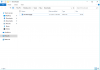
As the title states, I am trying to add an image to my scene. I go to source and add image, then select browse, but OBS cannot see or find or recognize any files within any folder I point it to. Case in point, I am staring at the .png file sitting in my download folder, but OBS says my download folder is empty...

Any help would be hugely appreciated.
 

Attachments

  • Capture.PNG
    Capture.PNG
    22.9 KB · Views: 308
  • Capture1.PNG
    Capture1.PNG
    70.6 KB · Views: 297
Update:

I figured out that OBS is looking in the administrator's downloads folder for some reason (and same with every other place I navigated it to). Even after signing out of the administrator account, it is continuing to look in the other account. I have no idea how to shift OBS's focus to this account.

Also, I am not sure how to delete this thread...
 
Solved it. Just do not run OBS as administrator (or, alternatively, make yourself the administrator).

Still not sure how to delete this thread...
 
You can always browse to any other folder of your choice (eg C:\Users\whatever\Downloads).
 
Back
Top