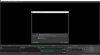
Question / Help Whatch out!! Newbie here... OBS black screen in display capture mode

Vink

New Member

Attachments

  • OBS capture 1.jpg
    OBS capture 1.jpg
    122.5 KB · Views: 16
16:22:23.632: Adapter 0: NVIDIA GeForce GTX 1050 Ti
16:22:23.632: Dedicated VRAM: 4213178368
16:22:23.632: Shared VRAM: 4214902784
16:22:23.632: output 0: pos={0, 0}, size={1920, 1080}, attached=true
16:22:23.632: output 1: pos={-3840, -242}, size={3840, 2160}, attached=true
16:22:23.633: Adapter 1: Intel(R) UHD Graphics 630
16:22:23.633: Dedicated VRAM: 134217728
16:22:23.633: Shared VRAM: 4214902784
16:22:23.642: Loading up D3D11 on adapter NVIDIA GeForce GTX 1050 Ti (0)
16:22:23.704: D3D11 loaded successfully, feature level used: b000
16:22:23.704: D3D11 GPU priority setup failed (not admin?)

OBS needs to run on your Intel GPU to perform a display capture on your machine.
 
It's in the link you posted in your own message;

 
The steps there definitely work. Post a log from your attempt after following those steps.
 
09:57:07.774: Loading up D3D11 on adapter NVIDIA GeForce GTX 1050 Ti (0)

Your log still shows OBS running on the NVIDIA GPU. Follow the steps to run it on the integrated GPU.
 
The log for power saving still shows "20:45:08.677: Loading up D3D11 on adapter NVIDIA GeForce GTX 1050 Ti (0)", so the configuration is not correct. Check you specified the correct obs.exe.
 
Back
Top