What is Recording params in Simple output mode?

TsebTra

New Member
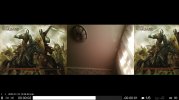
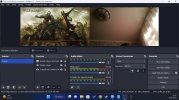
Hi. I'm trying to record some of my gameplay and in result i have scaled video in unproportional ratio and no 2,3,4,5,6 audio tracks. If i change output mode in Advanced, i get this functions but in results encoder overload and record looks bugged (pics). Can someone give me Simple output mode Recording params so i can use them? I try to find them in log's but without result. Sry for english.
 

Attachments

  • Без имени2.jpg
    Без имени2.jpg
    422.6 KB · Views: 27
  • Без имени3.jpg
    Без имени3.jpg
    312.5 KB · Views: 22
12:26:21.398: base resolution: 2564x720
Why?
Your CPU is 3. gen of I5, is old, very old now we have 13. gen
For this CPU max resolution is 1280x720, maybe less.
Power Efficency set to Maximum ?
 
12:26:21.398: base resolution: 2564x720
Why?
Your CPU is 3. gen of I5, is old, very old now we have 13. gen
For this CPU max resolution is 1280x720, maybe less.
Power Efficency set to Maximum ?
"For this CPU max resolution is 1280x720, maybe less."
In "Simple output mode Recording" all work's brilliant. And i make mistake in 1st post, in "Advanced output mode" encoder still not overload.
 
How is to possible ?
You have two screen:
1 - 1366x768
2 - 1920x1080

Your game is on 1 or 2 monitors ?
2564x720 is too high resolution for this CPU, without GPU
Set 1280x720, old CPU need lower resolution.
 
My CPU is fine with that. Only what i can't understend is why i have bugged video and how can i fix it.


And i found how to fix it but with lost of x2.5 of quality. I think problem can't fix bcz of video driver in intel hd 4xxx.
 
Your card is old and slow, is build in CPU, working on RAM (RAM vs VRAM, sometimes is 10x faster).
To encoding use QSV (hardware encoding in CPU), but for QSV max resolution is 1920x1080.
Quality = bitrate, set higher bitrate or for CQP better is lower, but need more power.
 
Back
Top