PauseTheCat
New Member
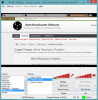
I am trying to capture my Google Chrome with OBS but I can't get it to work. First, I tried window mode but it would only capture the top left corner. I had Google as full screen and my monitor's dimensions are 1920 by 1080, but OBS thinks that it is 1280 by 720. I tried making a custom resolution but it only made the capture of the top left corner smaller. then, I tried monitor capture and it did the same thing. It does the same thing with windows such as Power Point as it does with Google Chrome. Also, I do have a laptop. I included a picture of what it was capturing in window mode.
Log File: https://gist.github.com/808f538a9bdea5548185
Log File: https://gist.github.com/808f538a9bdea5548185