Dean Louth
New Member
Hi guys,
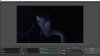
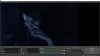
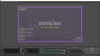
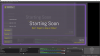
So I've ran into a strange issue as I was messing around with my OBS settings, I was on 1280x720 and everything was perfect! I decided to bump it up to 1920x1080 for recording purposes, but when I do all the scenes and stuff I have setup already dont quite stretch right and fill the space at the sides (leaving black bars) and it just feels somewhat awkward to use, for example it doesnt clip to the sides to fill gaps like it would if I was using 1280x720. Another example will be my webcam scene, on 1280x720 it fills the screen completely, yet when I change it to 1920x1080 it fills the scene but leaves a black margin to the right hand side (as far as I'm aware my webcam is also 1920x1080) am I missing something really basic here or is there more to it? ( ignore edgy picture;) )View attachment 33818 View attachment 33818 View attachment 33818 View attachment 33819 View attachment 33820 View attachment 33821 View attachment 33818 View attachment 33819 View attachment 33820 View attachment 33821
So I've ran into a strange issue as I was messing around with my OBS settings, I was on 1280x720 and everything was perfect! I decided to bump it up to 1920x1080 for recording purposes, but when I do all the scenes and stuff I have setup already dont quite stretch right and fill the space at the sides (leaving black bars) and it just feels somewhat awkward to use, for example it doesnt clip to the sides to fill gaps like it would if I was using 1280x720. Another example will be my webcam scene, on 1280x720 it fills the screen completely, yet when I change it to 1920x1080 it fills the scene but leaves a black margin to the right hand side (as far as I'm aware my webcam is also 1920x1080) am I missing something really basic here or is there more to it? ( ignore edgy picture;) )View attachment 33818 View attachment 33818 View attachment 33818 View attachment 33819 View attachment 33820 View attachment 33821 View attachment 33818 View attachment 33819 View attachment 33820 View attachment 33821