FleeingMonkey
New Member
I just installed OB Studio, and I had the same problem with OB Software
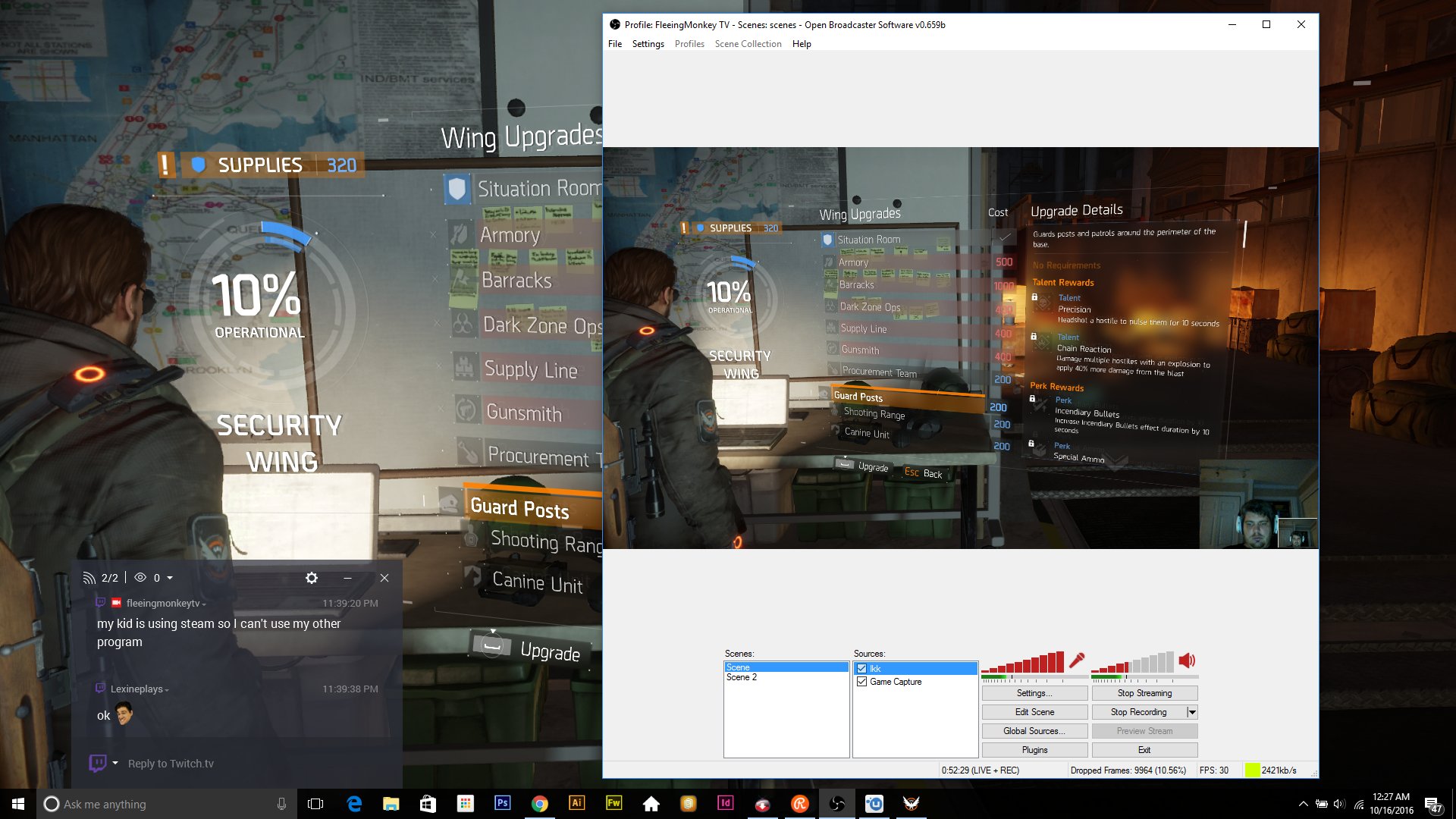
Only when I am using OBS, I have problem with my webcams. If I use my Acers Aspire V17 Nitro laptops Webcam it creates a PIP of me with the webcam. So you will see the game, then the webcam footage in the corner, and then the same webcam footage a 2nd time inside that. Does anyone know how to fix this? I've gone through the settings in OBS and I can't seem to find anything. Here is an example picture you can see at the bottom left of the panel there is two of me. Also the bigger version just starts to zoom in randomly.
While using other software such as Shadowplay, and Action! I don't have this problem.
Only when I am using OBS, I have problem with my webcams. If I use my Acers Aspire V17 Nitro laptops Webcam it creates a PIP of me with the webcam. So you will see the game, then the webcam footage in the corner, and then the same webcam footage a 2nd time inside that. Does anyone know how to fix this? I've gone through the settings in OBS and I can't seem to find anything. Here is an example picture you can see at the bottom left of the panel there is two of me. Also the bigger version just starts to zoom in randomly.
While using other software such as Shadowplay, and Action! I don't have this problem.