Hi
I'm on Ubuntu 14.04 with Virtualbox installed. On Virtualbox I run Windows7, because I need a system to play MTGO.
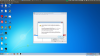
Now, I'm trying to streaming. Since I don't wanto to stream the entire VM from Ubuntu (where OBS doesn't give any problem) I've installed OBS on Virtualized Windows 7, but, when I try to push "Streaming Preview" it give the error "Could not get DXGI adapter 0" and than crashs.
Any Help?
Thanks
I'm on Ubuntu 14.04 with Virtualbox installed. On Virtualbox I run Windows7, because I need a system to play MTGO.
Now, I'm trying to streaming. Since I don't wanto to stream the entire VM from Ubuntu (where OBS doesn't give any problem) I've installed OBS on Virtualized Windows 7, but, when I try to push "Streaming Preview" it give the error "Could not get DXGI adapter 0" and than crashs.
Any Help?
Thanks